
Introducing Oplane Fixes

We published the rule in August. Whoever writes a change does not get to certify it. Then we had to ship a feature that writes changes, and that one rule is what this release is shaped around.
Today Oplane starts writing the fix, not only the finding. It reads a pull request or merge request, works out which security requirements apply to what the change actually does, and says which of them the code does not meet. Until this release that is where it stopped, and somebody on the team still had to go and write the code.
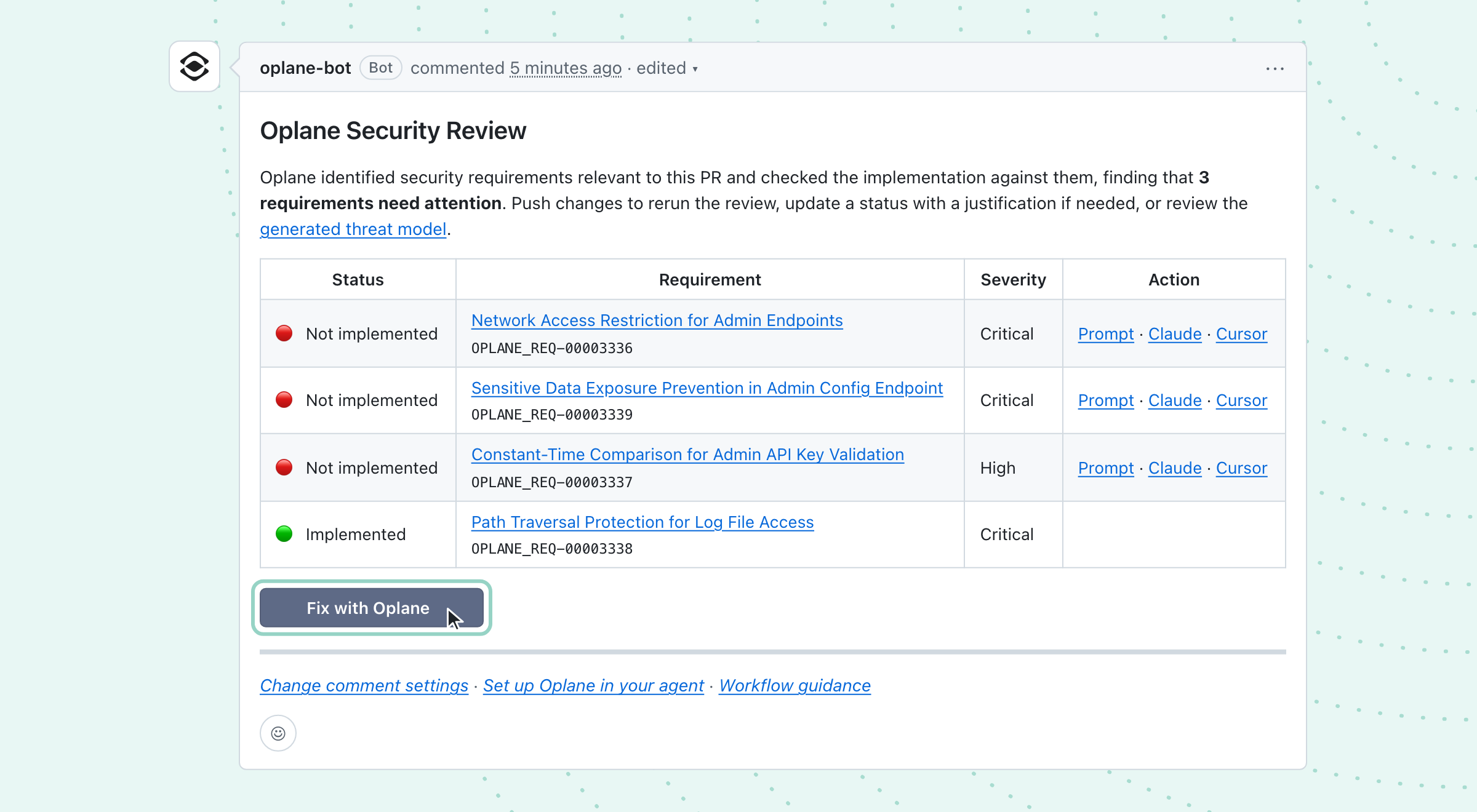
Fixes turns an unresolved requirement into a diff you can read and apply from the review itself, through a Fix with Oplane button at the end of the Oplane Security Review comment. Each one appears in the product as a suggested fix, which you read before anything happens. Fixes is available on request, granted per organisation.
What it does not do is mark its own work as done. Oplane writes the fix and you apply it, but a requirement only counts as resolved once the next review has assessed the new code on the branch. In other words, the part that writes the change never gets to say the change worked, which is the rule we published in August and the reason this release looks the way it does.
What a suggested fix is
A requirement is a security condition that applies to what your change actually does, such as admin endpoints being reachable only from inside your network. Each one comes with verification cases, the specific checks the code has to pass before the requirement counts as implemented. In other words, the requirement says what has to be true, and the verification cases say how anyone would tell.
A suggested fix is written to pass all of those cases, not to make one failing example go away, and it checks the rest of the file for the same gap. The same cases are what the next review checks the code against, and that is deliberate. They are the definition of done, and a fix and its review should agree on what done means. What they must not share is the step that decides whether it was reached.
It is also complete or it is not offered. The fix carries the changes it depends on, such as imports, helpers, service registration or config, and it is written against what is in your files at the head of the branch rather than against a stale copy. Oplane never suggests a patch that closes only part of a requirement, because a developer who applies a partial fix walks away believing the job is done.
When the complete fix would be a large change or turn into a refactor across the codebase, Oplane writes a plan instead of a patch, naming every place that has to change and where to start. When the right fix depends on a choice only your team can make, such as how tenants should be scoped, it lays out the options and leaves the decision in the pull request where it belongs.
How Fixes works
Click to fix starts in the review comment. Click Fix with Oplane there and Oplane opens the requirements with their suggested fixes beside them. Each one shows why the requirement applies, the risk if it does not hold, the files it touches, and the exact diff, split or unified.
Every suggested fix starts out selected, and you untick any you would rather write yourself. It can be one of them, or all of them, and nothing is committed until you act.
Oplane then applies what you selected. The patch you reviewed is the patch that gets committed, applied as written rather than regenerated at apply time, and it is all or nothing: if the whole plan does not apply cleanly, nothing is committed. The commit is made by the Oplane app on the pull request’s own branch, and the person who applied it is recorded in the audit log. That commit then triggers a follow-up review, which checks that the fixes work and did not introduce anything new.
How teams use it
Take the review at the top of this page. A constant-time comparison for an API key check is a few lines in one file, the kind of fix you apply straight from the review before the pull request merges, together with any others like it, while the author is still in the change and the context is fresh.
Restricting admin endpoints to an internal network can be a different kind of requirement. When the control belongs in infrastructure rather than in this repository, Oplane says where it lives instead of writing a patch, and when the change is large, the plan it writes is where the team’s own coding agent starts. Every requirement in the review carries a prompt for Claude, Cursor or any other agent for exactly that.
Security teams read it from the other side. Because each fix is committed to the pull request under review, it goes through the same code review and the same pipeline as any other change, with the person who applied it on record. Nobody has to trust a separate channel of automated changes arriving from somewhere else.
Why Oplane does not mark its own fix as done
In August, Emil published the argument this is built on. A fix should be driven by the requirement rather than by a reproducer, and whoever writes a change does not get to certify it. That ruled out the cheaper build, the one where an agent reads the finding, writes a patch and marks the finding resolved.
So the fix path does not get to decide whether a requirement is implemented. It writes code and stops. The requirement moves only when a later review pass reads the new code on the branch and assesses it, which means a requirement can still read unresolved in the minutes after you applied its fix. That gap is the argument working, not a rough edge.
What Fixes will not do
Oplane declines to commit rather than guessing, in two separate cases. If two fixes want to edit the same lines, that is a collision and nothing is applied. If the branch has moved since the review, the changes are still good but the view is stale, so it says so and you re-run against the new head.
And applying a fix proves nothing about the code. It does not build your project or run your tests, so your pipeline does its usual work on the commit. What you get from Oplane is the change you read and approved, committed exactly as you read it.
Getting started
Fixes is in early access and available on request, granted per organisation. Once your organisation has it, a workspace owner or org admin turns suggested fixes on repository by repository in workspace settings, so nothing changes in a repository until someone chooses it. Because the commit is made by the Oplane app, the app needs write access on the repositories you enable. The docs walk through turning it on and applying fixes, including what each message means when a fix cannot be applied.
Ask us for access and we will switch it on during a call, on your own code rather than on ours. The argument behind it is worth reading first.
See it fix something in your own repository
Suggested fixes is available on request. Access is granted per organisation, and you choose where it runs.