Connect Oplane to your GitHub repositories to enable automated threat modeling on pull requests. The setup takes just a few minutes.
Connect Oplane to your GitHub repositories to enable automated threat modeling on pull requests. The setup takes just a few minutes.
1
Open Workspaces
Navigate to Workspaces in the left sidebar and click the + Workspace button in the top right corner.
Click the + Workspace button
2
Add a repository source
On the New Workspace page, enter a Name and optional Description. Then under Sources, click Continue with GitHub to connect your account. You can also set Access for the workspace on this same page, or leave Sources empty to run threat modeling locally via MCP.
3
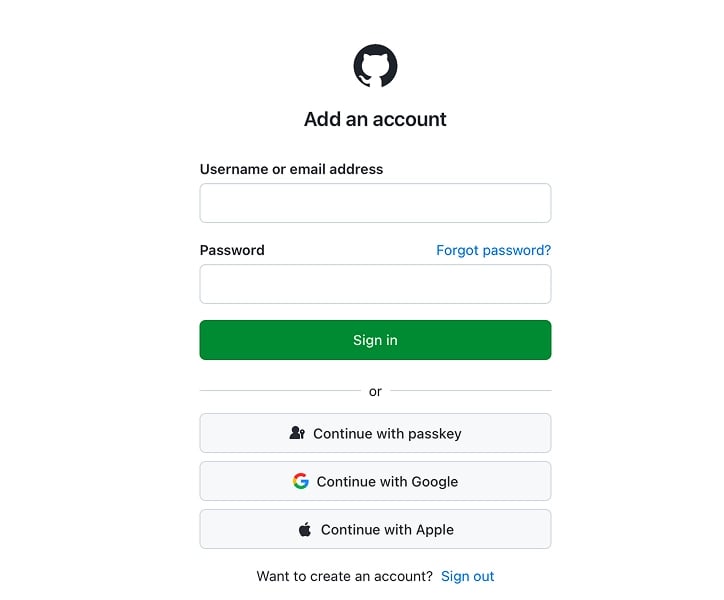
Sign in to GitHub
Oplane redirects you to GitHub to sign in. Enter your credentials or use one of the alternative sign-in methods (passkey, Google, Apple).
4
Install the Oplane GitHub App
GitHub prompts you to install the Oplane Bot on your account or organisation. Choose which repositories Oplane should have access to, review the permissions, and click Install.Permissions granted: Read and write access to code, issues, checks, and pull requests. This lets Oplane post review comments, update check status, and commit suggested fixes when you apply them. Read access to members and metadata.
5
Select a repository
Once your account is connected, Sources shows a Git namespace dropdown alongside a repository search. Pick the namespace (your personal account or an organisation), search for the repository you want, and click Select. Use Add GitHub account or Switch Git provider in the dropdown to connect a different account or provider.
GitHub organisations already claimed by a different Oplane organisation appear greyed out in the picker and cannot be selected. See Namespace claims for details.
6
Configure and create
Once a repository is selected, an Analyse Pull Requests toggle appears. Leave it on to automatically threat model every PR. If disabled, you can still trigger reviews by mentioning @oplane in a PR comment.Under Access, add team members who should have access and set General access (Restricted, or open to the organisation). Then click Create.
7
Choose threat models
Oplane analyses your repository and suggests threat models based on the codebase. Select the ones relevant to your project, or describe your own scope in the text box. You can also click Skip and go to workspace to do this later. This step helps Oplane understand what to focus on in future PR reviews.
What's next?
Learn how Oplane reviews your pull requests.
⌘I
{"docsConfig":{"theme":"almond","$schema":"https://mintlify.com/docs.json","name":"Oplane","description":"AI-powered threat modeling for development teams. Identify and fix architectural security vulnerabilities automatically.","colors":{"primary":"#6C839B","light":"#96D3C5","dark":"#506a82"},"logo":{"light":"https://mintcdn.com/oplane-6a173d70/uqOTzwko8R_TS2je/logo/light.svg?fit=max\u0026auto=format\u0026n=uqOTzwko8R_TS2je\u0026q=85\u0026s=abdda051a56f28d92a1f37204542208a","dark":"https://mintcdn.com/oplane-6a173d70/uqOTzwko8R_TS2je/logo/dark.svg?fit=max\u0026auto=format\u0026n=uqOTzwko8R_TS2je\u0026q=85\u0026s=c410a3078e6af48aace25f7b8db6df0e","href":"https://www.oplane.com"},"favicon":"https://mintcdn.com/oplane-6a173d70/uqOTzwko8R_TS2je/favicon.svg?fit=max\u0026auto=format\u0026n=uqOTzwko8R_TS2je\u0026q=85\u0026s=cbec404294633cbcfdcbdec093bbda7e","background":{"color":{"light":"#F9F9F9","dark":"#151517"}},"navbar":{"links":[{"href":"https://gravity.oplane.com/login","label":"Log in"}],"primary":{"type":"button","label":"Try for free","href":"https://gravity.oplane.com/signup"}},"footer":{"socials":{"x":"https://x.com/oplaneai"}},"fonts":{"heading":{"family":"IBM Plex Sans","weight":700},"body":{"family":"IBM Plex Sans","weight":400}},"icons":{"library":"lucide"},"styling":{"eyebrows":"breadcrumbs","latex":false},"contextual":{"options":["copy","view","assistant","mcp","add-mcp"],"display":"header"},"navigation":{"global":{"anchors":[{"anchor":"Home","icon":"house","href":"/"}]},"directory":"card","pages":[]}},"deployment":{"deploymentMetadataValue":{"subdomain":"oplane-6a173d70","hasAudioNarration":false,"actualSubdomain":"oplane-6a173d70","customDomains":["www.oplane.com"],"gitSource":{"type":"github","owner":"oplane","repo":"website-docs","deployBranch":"main","contentDirectory":"","isPrivate":true,"mountPath":"","label":""},"entitlements":{"AI_CHAT":{"status":"ENABLED"}},"buildId":"6af7249436896a78e7f5dc4e","clientVersion":"0.0.4143","searchFilterCounts":[{"language":"default","tag":"Administration","count":6},{"language":"default","tag":"Help","count":6},{"language":"default","tag":"What's new","count":6},{"language":"default","tag":"Connect","count":4},{"language":"default","tag":"Find","count":4},{"language":"default","tag":"Reference","count":4},{"language":"default","tag":"Prove","count":3},{"language":"default","tag":"How it works","count":2},{"language":"default","tag":"Start","count":2},{"language":"default","tag":"Fix","count":1}]},"assistantConfig":{"enableAskAiButton":false,"enableStarterQuestions":false,"enableContextualStarterQuestions":false,"enableAskAiSearchBar":true},"basePath":"/docs","hasChatPermissions":true,"hasWebMcpPermissions":false,"toggles":[{"name":"kill-isr","enabled":true,"variant":{"name":"disabled","enabled":false,"feature_enabled":true},"impressionData":false},{"name":"custom-rbac-roles","enabled":true,"variant":{"name":"disabled","enabled":false,"feature_enabled":true},"impressionData":false},{"name":"agent-mintlify-slack","enabled":true,"variant":{"name":"disabled","enabled":false,"feature_enabled":true},"impressionData":false},{"name":"agent-integrations-settings","enabled":true,"variant":{"name":"disabled","enabled":false,"feature_enabled":true},"impressionData":false},{"name":"rbac-expansion","enabled":true,"variant":{"name":"disabled","enabled":false,"feature_enabled":true},"impressionData":false},{"name":"automations-pr-grouping","enabled":true,"variant":{"name":"disabled","enabled":false,"feature_enabled":true},"impressionData":false},{"name":"custom-prefix","enabled":true,"variant":{"name":"disabled","enabled":false,"feature_enabled":true},"impressionData":false},{"name":"analytics-v7","enabled":true,"variant":{"name":"disabled","enabled":false,"feature_enabled":true},"impressionData":false},{"name":"user-flows-analytics","enabled":true,"variant":{"name":"disabled","enabled":false,"feature_enabled":true},"impressionData":false},{"name":"no-publish-flow","enabled":true,"variant":{"name":"disabled","enabled":false,"feature_enabled":true},"impressionData":false},{"name":"workos-onboarding","enabled":true,"variant":{"name":"disabled","enabled":false,"feature_enabled":true},"impressionData":false},{"name":"snapshot-serving-live","enabled":true,"variant":{"name":"disabled","enabled":false,"feature_enabled":true},"impressionData":false},{"name":"stripTemperatureMiddleware","enabled":true,"variant":{"name":"disabled","enabled":false,"feature_enabled":true},"impressionData":false},{"name":"support-platform-pylon-zendesk","enabled":true,"variant":{"name":"disabled","enabled":false,"feature_enabled":true},"impressionData":false},{"name":"snapshot-serving","enabled":true,"variant":{"name":"disabled","enabled":false,"feature_enabled":true},"impressionData":false},{"name":"instant-rollback","enabled":true,"variant":{"name":"disabled","enabled":false,"feature_enabled":true},"impressionData":false},{"name":"granular-notifications-server","enabled":true,"variant":{"name":"disabled","enabled":false,"feature_enabled":true},"impressionData":false},{"name":"granular-notifications","enabled":true,"variant":{"name":"disabled","enabled":false,"feature_enabled":true},"impressionData":false},{"name":"automations-fable","enabled":true,"variant":{"name":"disabled","enabled":false,"feature_enabled":true},"impressionData":false},{"name":"fixed-ai-action-pricing","enabled":true,"variant":{"name":"disabled","enabled":false,"feature_enabled":true},"impressionData":false},{"name":"automation-resolve-merge-conflict","enabled":true,"variant":{"name":"disabled","enabled":false,"feature_enabled":true},"impressionData":false},{"name":"scoped-publishing","enabled":true,"variant":{"name":"disabled","enabled":false,"feature_enabled":true},"impressionData":false},{"name":"mintql","enabled":true,"variant":{"name":"disabled","enabled":false,"feature_enabled":true},"impressionData":false},{"name":"page-level-analytics","enabled":true,"variant":{"name":"disabled","enabled":false,"feature_enabled":true},"impressionData":false},{"name":"editor-version-history-v2","enabled":true,"variant":{"name":"disabled","enabled":false,"feature_enabled":true},"impressionData":false},{"name":"billing-page-v2","enabled":true,"variant":{"name":"disabled","enabled":false,"feature_enabled":true},"impressionData":false},{"name":"full-page-search","enabled":true,"variant":{"name":"disabled","enabled":false,"feature_enabled":true},"impressionData":false},{"name":"workspace-projects","enabled":true,"variant":{"name":"disabled","enabled":false,"feature_enabled":true},"impressionData":false},{"name":"assistant-v5","enabled":true,"variant":{"name":"disabled","enabled":false,"feature_enabled":true},"impressionData":false},{"name":"fork-pr-previews","enabled":true,"variant":{"name":"disabled","enabled":false,"feature_enabled":true},"impressionData":false},{"name":"revalidation-jwt","enabled":true,"variant":{"name":"disabled","enabled":false,"feature_enabled":true},"impressionData":false},{"name":"workos-sso-scim","enabled":true,"variant":{"name":"disabled","enabled":false,"feature_enabled":true},"impressionData":false},{"name":"hobby-abuse-scan","enabled":true,"variant":{"name":"disabled","enabled":false,"feature_enabled":true},"impressionData":false},{"name":"dashboard-inbox","enabled":true,"variant":{"name":"disabled","enabled":false,"feature_enabled":true},"impressionData":false},{"name":"workos-signup","enabled":true,"variant":{"name":"disabled","enabled":false,"feature_enabled":true},"impressionData":false},{"name":"turbopuffer-dual-write","enabled":true,"variant":{"name":"disabled","enabled":false,"feature_enabled":true},"impressionData":false},{"name":"workos-enabled","enabled":true,"variant":{"name":"disabled","enabled":false,"feature_enabled":true},"impressionData":false},{"name":"approve-review-flow","enabled":true,"variant":{"name":"disabled","enabled":false,"feature_enabled":true},"impressionData":false},{"name":"editor-metadata","enabled":true,"variant":{"name":"disabled","enabled":false,"feature_enabled":true},"impressionData":false},{"name":"sso-setup-deadline-banner","enabled":true,"variant":{"name":"disabled","enabled":false,"feature_enabled":true},"impressionData":false},{"name":"turbopuffer-serve","enabled":true,"variant":{"name":"disabled","enabled":false,"feature_enabled":true},"impressionData":false},{"name":"live-agents","enabled":true,"variant":{"name":"disabled","enabled":false,"feature_enabled":true},"impressionData":false},{"name":"llms-txt-v2","enabled":true,"variant":{"name":"disabled","enabled":false,"feature_enabled":true},"impressionData":false}],"googleFontsInlined":true},"customCss":[{"filePath":"style.css","content":"/* cyrillic-ext */\n@font-face {\n font-family: 'IBM Plex Mono';\n font-style: normal;\n font-weight: 400;\n font-display: swap;\n src: url(/docs/_mintlify/assets/fonts/google/s/ibmplexmono/v23/-F63fjptAgt5VM-kVkqdyU8n1iIq129k.woff2) format('woff2');\n unicode-range: U+0460-052F, U+1C80-1C8A, U+20B4, U+2DE0-2DFF, U+A640-A69F, U+FE2E-FE2F;\n}\n/* cyrillic */\n@font-face {\n font-family: 'IBM Plex Mono';\n font-style: normal;\n font-weight: 400;\n font-display: swap;\n src: url(/docs/_mintlify/assets/fonts/google/s/ibmplexmono/v23/-F63fjptAgt5VM-kVkqdyU8n1isq129k.woff2) format('woff2');\n unicode-range: U+0301, U+0400-045F, U+0490-0491, U+04B0-04B1, U+2116;\n}\n/* symbols2 */\n@font-face {\n font-family: 'IBM Plex Mono';\n font-style: normal;\n font-weight: 400;\n font-display: swap;\n src: url(/docs/_mintlify/assets/fonts/google/s/ibmplexmono/v23/-F63fjptAgt5VM-kVkqdyU8n1pUL8lJdhg.woff2) format('woff2');\n unicode-range: U+2000-2001, U+2004-2008, U+200A, U+23B8-23BD, U+2500-259F;\n}\n/* vietnamese */\n@font-face {\n font-family: 'IBM Plex Mono';\n font-style: normal;\n font-weight: 400;\n font-display: swap;\n src: url(/docs/_mintlify/assets/fonts/google/s/ibmplexmono/v23/-F63fjptAgt5VM-kVkqdyU8n1iAq129k.woff2) format('woff2');\n unicode-range: U+0102-0103, U+0110-0111, U+0128-0129, U+0168-0169, U+01A0-01A1, U+01AF-01B0, U+0300-0301, U+0303-0304, U+0308-0309, U+0323, U+0329, U+1EA0-1EF9, U+20AB;\n}\n/* latin-ext */\n@font-face {\n font-family: 'IBM Plex Mono';\n font-style: normal;\n font-weight: 400;\n font-display: swap;\n src: url(/docs/_mintlify/assets/fonts/google/s/ibmplexmono/v23/-F63fjptAgt5VM-kVkqdyU8n1iEq129k.woff2) format('woff2');\n unicode-range: U+0100-02BA, U+02BD-02C5, U+02C7-02CC, U+02CE-02D7, U+02DD-02FF, U+0304, U+0308, U+0329, U+1D00-1DBF, U+1E00-1E9F, U+1EF2-1EFF, U+2020, U+20A0-20AB, U+20AD-20C4, U+2113, U+2C60-2C7F, U+A720-A7FF;\n}\n/* latin */\n@font-face {\n font-family: 'IBM Plex Mono';\n font-style: normal;\n font-weight: 400;\n font-display: swap;\n src: url(/docs/_mintlify/assets/fonts/google/s/ibmplexmono/v23/-F63fjptAgt5VM-kVkqdyU8n1i8q1w.woff2) format('woff2');\n unicode-range: U+0000-00FF, U+0131, U+0152-0153, U+02BB-02BC, U+02C6, U+02DA, U+02DC, U+0304, U+0308, U+0329, U+2000-206F, U+20AC, U+2122, U+2191, U+2193, U+2212, U+2215, U+FEFF, U+FFFD;\n}\n/* cyrillic-ext */\n@font-face {\n font-family: 'IBM Plex Mono';\n font-style: normal;\n font-weight: 500;\n font-display: swap;\n src: url(/docs/_mintlify/assets/fonts/google/s/ibmplexmono/v23/-F6qfjptAgt5VM-kVkqdyU8n3twJwl1FgtIU.woff2) format('woff2');\n unicode-range: U+0460-052F, U+1C80-1C8A, U+20B4, U+2DE0-2DFF, U+A640-A69F, U+FE2E-FE2F;\n}\n/* cyrillic */\n@font-face {\n font-family: 'IBM Plex Mono';\n font-style: normal;\n font-weight: 500;\n font-display: swap;\n src: url(/docs/_mintlify/assets/fonts/google/s/ibmplexmono/v23/-F6qfjptAgt5VM-kVkqdyU8n3twJwlRFgtIU.woff2) format('woff2');\n unicode-range: U+0301, U+0400-045F, U+0490-0491, U+04B0-04B1, U+2116;\n}\n/* symbols2 */\n@font-face {\n font-family: 'IBM Plex Mono';\n font-style: normal;\n font-weight: 500;\n font-display: swap;\n src: url(/docs/_mintlify/assets/fonts/google/s/ibmplexmono/v23/-F6qfjptAgt5VM-kVkqdyU8n3twJwupkp-8tFQ.woff2) format('woff2');\n unicode-range: U+2000-2001, U+2004-2008, U+200A, U+23B8-23BD, U+2500-259F;\n}\n/* vietnamese */\n@font-face {\n font-family: 'IBM Plex Mono';\n font-style: normal;\n font-weight: 500;\n font-display: swap;\n src: url(/docs/_mintlify/assets/fonts/google/s/ibmplexmono/v23/-F6qfjptAgt5VM-kVkqdyU8n3twJwl9FgtIU.woff2) format('woff2');\n unicode-range: U+0102-0103, U+0110-0111, U+0128-0129, U+0168-0169, U+01A0-01A1, U+01AF-01B0, U+0300-0301, U+0303-0304, U+0308-0309, U+0323, U+0329, U+1EA0-1EF9, U+20AB;\n}\n/* latin-ext */\n@font-face {\n font-family: 'IBM Plex Mono';\n font-style: normal;\n font-weight: 500;\n font-display: swap;\n src: url(/docs/_mintlify/assets/fonts/google/s/ibmplexmono/v23/-F6qfjptAgt5VM-kVkqdyU8n3twJwl5FgtIU.woff2) format('woff2');\n unicode-range: U+0100-02BA, U+02BD-02C5, U+02C7-02CC, U+02CE-02D7, U+02DD-02FF, U+0304, U+0308, U+0329, U+1D00-1DBF, U+1E00-1E9F, U+1EF2-1EFF, U+2020, U+20A0-20AB, U+20AD-20C4, U+2113, U+2C60-2C7F, U+A720-A7FF;\n}\n/* latin */\n@font-face {\n font-family: 'IBM Plex Mono';\n font-style: normal;\n font-weight: 500;\n font-display: swap;\n src: url(/docs/_mintlify/assets/fonts/google/s/ibmplexmono/v23/-F6qfjptAgt5VM-kVkqdyU8n3twJwlBFgg.woff2) format('woff2');\n unicode-range: U+0000-00FF, U+0131, U+0152-0153, U+02BB-02BC, U+02C6, U+02DA, U+02DC, U+0304, U+0308, U+0329, U+2000-206F, U+20AC, U+2122, U+2191, U+2193, U+2212, U+2215, U+FEFF, U+FFFD;\n}\n/* cyrillic-ext */\n@font-face {\n font-family: 'IBM Plex Sans';\n font-style: normal;\n font-weight: 400;\n font-stretch: 100%;\n font-display: swap;\n src: url(/docs/_mintlify/assets/fonts/google/s/ibmplexsans/v23/zYXzKVElMYYaJe8bpLHnCwDKr932-G7dytD-Dmu1syxTKYbABA.woff2) format('woff2');\n unicode-range: U+0460-052F, U+1C80-1C8A, U+20B4, U+2DE0-2DFF, U+A640-A69F, U+FE2E-FE2F;\n}\n/* cyrillic */\n@font-face {\n font-family: 'IBM Plex Sans';\n font-style: normal;\n font-weight: 400;\n font-stretch: 100%;\n font-display: swap;\n src: url(/docs/_mintlify/assets/fonts/google/s/ibmplexsans/v23/zYXzKVElMYYaJe8bpLHnCwDKr932-G7dytD-Dmu1syxaKYbABA.woff2) format('woff2');\n unicode-range: U+0301, U+0400-045F, U+0490-0491, U+04B0-04B1, U+2116;\n}\n/* greek */\n@font-face {\n font-family: 'IBM Plex Sans';\n font-style: normal;\n font-weight: 400;\n font-stretch: 100%;\n font-display: swap;\n src: url(/docs/_mintlify/assets/fonts/google/s/ibmplexsans/v23/zYXzKVElMYYaJe8bpLHnCwDKr932-G7dytD-Dmu1syxdKYbABA.woff2) format('woff2');\n unicode-range: U+0370-0377, U+037A-037F, U+0384-038A, U+038C, U+038E-03A1, U+03A3-03FF;\n}\n/* vietnamese */\n@font-face {\n font-family: 'IBM Plex Sans';\n font-style: normal;\n font-weight: 400;\n font-stretch: 100%;\n font-display: swap;\n src: url(/docs/_mintlify/assets/fonts/google/s/ibmplexsans/v23/zYXzKVElMYYaJe8bpLHnCwDKr932-G7dytD-Dmu1syxRKYbABA.woff2) format('woff2');\n unicode-range: U+0102-0103, U+0110-0111, U+0128-0129, U+0168-0169, U+01A0-01A1, U+01AF-01B0, U+0300-0301, U+0303-0304, U+0308-0309, U+0323, U+0329, U+1EA0-1EF9, U+20AB;\n}\n/* latin-ext */\n@font-face {\n font-family: 'IBM Plex Sans';\n font-style: normal;\n font-weight: 400;\n font-stretch: 100%;\n font-display: swap;\n src: url(/docs/_mintlify/assets/fonts/google/s/ibmplexsans/v23/zYXzKVElMYYaJe8bpLHnCwDKr932-G7dytD-Dmu1syxQKYbABA.woff2) format('woff2');\n unicode-range: U+0100-02BA, U+02BD-02C5, U+02C7-02CC, U+02CE-02D7, U+02DD-02FF, U+0304, U+0308, U+0329, U+1D00-1DBF, U+1E00-1E9F, U+1EF2-1EFF, U+2020, U+20A0-20AB, U+20AD-20C4, U+2113, U+2C60-2C7F, U+A720-A7FF;\n}\n/* latin */\n@font-face {\n font-family: 'IBM Plex Sans';\n font-style: normal;\n font-weight: 400;\n font-stretch: 100%;\n font-display: swap;\n src: url(/docs/_mintlify/assets/fonts/google/s/ibmplexsans/v23/zYXzKVElMYYaJe8bpLHnCwDKr932-G7dytD-Dmu1syxeKYY.woff2) format('woff2');\n unicode-range: U+0000-00FF, U+0131, U+0152-0153, U+02BB-02BC, U+02C6, U+02DA, U+02DC, U+0304, U+0308, U+0329, U+2000-206F, U+20AC, U+2122, U+2191, U+2193, U+2212, U+2215, U+FEFF, U+FFFD;\n}\n/* cyrillic-ext */\n@font-face {\n font-family: 'IBM Plex Sans';\n font-style: normal;\n font-weight: 500;\n font-stretch: 100%;\n font-display: swap;\n src: url(/docs/_mintlify/assets/fonts/google/s/ibmplexsans/v23/zYXzKVElMYYaJe8bpLHnCwDKr932-G7dytD-Dmu1syxTKYbABA.woff2) format('woff2');\n unicode-range: U+0460-052F, U+1C80-1C8A, U+20B4, U+2DE0-2DFF, U+A640-A69F, U+FE2E-FE2F;\n}\n/* cyrillic */\n@font-face {\n font-family: 'IBM Plex Sans';\n font-style: normal;\n font-weight: 500;\n font-stretch: 100%;\n font-display: swap;\n src: url(/docs/_mintlify/assets/fonts/google/s/ibmplexsans/v23/zYXzKVElMYYaJe8bpLHnCwDKr932-G7dytD-Dmu1syxaKYbABA.woff2) format('woff2');\n unicode-range: U+0301, U+0400-045F, U+0490-0491, U+04B0-04B1, U+2116;\n}\n/* greek */\n@font-face {\n font-family: 'IBM Plex Sans';\n font-style: normal;\n font-weight: 500;\n font-stretch: 100%;\n font-display: swap;\n src: url(/docs/_mintlify/assets/fonts/google/s/ibmplexsans/v23/zYXzKVElMYYaJe8bpLHnCwDKr932-G7dytD-Dmu1syxdKYbABA.woff2) format('woff2');\n unicode-range: U+0370-0377, U+037A-037F, U+0384-038A, U+038C, U+038E-03A1, U+03A3-03FF;\n}\n/* vietnamese */\n@font-face {\n font-family: 'IBM Plex Sans';\n font-style: normal;\n font-weight: 500;\n font-stretch: 100%;\n font-display: swap;\n src: url(/docs/_mintlify/assets/fonts/google/s/ibmplexsans/v23/zYXzKVElMYYaJe8bpLHnCwDKr932-G7dytD-Dmu1syxRKYbABA.woff2) format('woff2');\n unicode-range: U+0102-0103, U+0110-0111, U+0128-0129, U+0168-0169, U+01A0-01A1, U+01AF-01B0, U+0300-0301, U+0303-0304, U+0308-0309, U+0323, U+0329, U+1EA0-1EF9, U+20AB;\n}\n/* latin-ext */\n@font-face {\n font-family: 'IBM Plex Sans';\n font-style: normal;\n font-weight: 500;\n font-stretch: 100%;\n font-display: swap;\n src: url(/docs/_mintlify/assets/fonts/google/s/ibmplexsans/v23/zYXzKVElMYYaJe8bpLHnCwDKr932-G7dytD-Dmu1syxQKYbABA.woff2) format('woff2');\n unicode-range: U+0100-02BA, U+02BD-02C5, U+02C7-02CC, U+02CE-02D7, U+02DD-02FF, U+0304, U+0308, U+0329, U+1D00-1DBF, U+1E00-1E9F, U+1EF2-1EFF, U+2020, U+20A0-20AB, U+20AD-20C4, U+2113, U+2C60-2C7F, U+A720-A7FF;\n}\n/* latin */\n@font-face {\n font-family: 'IBM Plex Sans';\n font-style: normal;\n font-weight: 500;\n font-stretch: 100%;\n font-display: swap;\n src: url(/docs/_mintlify/assets/fonts/google/s/ibmplexsans/v23/zYXzKVElMYYaJe8bpLHnCwDKr932-G7dytD-Dmu1syxeKYY.woff2) format('woff2');\n unicode-range: U+0000-00FF, U+0131, U+0152-0153, U+02BB-02BC, U+02C6, U+02DA, U+02DC, U+0304, U+0308, U+0329, U+2000-206F, U+20AC, U+2122, U+2191, U+2193, U+2212, U+2215, U+FEFF, U+FFFD;\n}\n/* cyrillic-ext */\n@font-face {\n font-family: 'IBM Plex Sans';\n font-style: normal;\n font-weight: 600;\n font-stretch: 100%;\n font-display: swap;\n src: url(/docs/_mintlify/assets/fonts/google/s/ibmplexsans/v23/zYXzKVElMYYaJe8bpLHnCwDKr932-G7dytD-Dmu1syxTKYbABA.woff2) format('woff2');\n unicode-range: U+0460-052F, U+1C80-1C8A, U+20B4, U+2DE0-2DFF, U+A640-A69F, U+FE2E-FE2F;\n}\n/* cyrillic */\n@font-face {\n font-family: 'IBM Plex Sans';\n font-style: normal;\n font-weight: 600;\n font-stretch: 100%;\n font-display: swap;\n src: url(/docs/_mintlify/assets/fonts/google/s/ibmplexsans/v23/zYXzKVElMYYaJe8bpLHnCwDKr932-G7dytD-Dmu1syxaKYbABA.woff2) format('woff2');\n unicode-range: U+0301, U+0400-045F, U+0490-0491, U+04B0-04B1, U+2116;\n}\n/* greek */\n@font-face {\n font-family: 'IBM Plex Sans';\n font-style: normal;\n font-weight: 600;\n font-stretch: 100%;\n font-display: swap;\n src: url(/docs/_mintlify/assets/fonts/google/s/ibmplexsans/v23/zYXzKVElMYYaJe8bpLHnCwDKr932-G7dytD-Dmu1syxdKYbABA.woff2) format('woff2');\n unicode-range: U+0370-0377, U+037A-037F, U+0384-038A, U+038C, U+038E-03A1, U+03A3-03FF;\n}\n/* vietnamese */\n@font-face {\n font-family: 'IBM Plex Sans';\n font-style: normal;\n font-weight: 600;\n font-stretch: 100%;\n font-display: swap;\n src: url(/docs/_mintlify/assets/fonts/google/s/ibmplexsans/v23/zYXzKVElMYYaJe8bpLHnCwDKr932-G7dytD-Dmu1syxRKYbABA.woff2) format('woff2');\n unicode-range: U+0102-0103, U+0110-0111, U+0128-0129, U+0168-0169, U+01A0-01A1, U+01AF-01B0, U+0300-0301, U+0303-0304, U+0308-0309, U+0323, U+0329, U+1EA0-1EF9, U+20AB;\n}\n/* latin-ext */\n@font-face {\n font-family: 'IBM Plex Sans';\n font-style: normal;\n font-weight: 600;\n font-stretch: 100%;\n font-display: swap;\n src: url(/docs/_mintlify/assets/fonts/google/s/ibmplexsans/v23/zYXzKVElMYYaJe8bpLHnCwDKr932-G7dytD-Dmu1syxQKYbABA.woff2) format('woff2');\n unicode-range: U+0100-02BA, U+02BD-02C5, U+02C7-02CC, U+02CE-02D7, U+02DD-02FF, U+0304, U+0308, U+0329, U+1D00-1DBF, U+1E00-1E9F, U+1EF2-1EFF, U+2020, U+20A0-20AB, U+20AD-20C4, U+2113, U+2C60-2C7F, U+A720-A7FF;\n}\n/* latin */\n@font-face {\n font-family: 'IBM Plex Sans';\n font-style: normal;\n font-weight: 600;\n font-stretch: 100%;\n font-display: swap;\n src: url(/docs/_mintlify/assets/fonts/google/s/ibmplexsans/v23/zYXzKVElMYYaJe8bpLHnCwDKr932-G7dytD-Dmu1syxeKYY.woff2) format('woff2');\n unicode-range: U+0000-00FF, U+0131, U+0152-0153, U+02BB-02BC, U+02C6, U+02DA, U+02DC, U+0304, U+0308, U+0329, U+2000-206F, U+20AC, U+2122, U+2191, U+2193, U+2212, U+2215, U+FEFF, U+FFFD;\n}\n/* cyrillic-ext */\n@font-face {\n font-family: 'IBM Plex Sans';\n font-style: normal;\n font-weight: 700;\n font-stretch: 100%;\n font-display: swap;\n src: url(/docs/_mintlify/assets/fonts/google/s/ibmplexsans/v23/zYXzKVElMYYaJe8bpLHnCwDKr932-G7dytD-Dmu1syxTKYbABA.woff2) format('woff2');\n unicode-range: U+0460-052F, U+1C80-1C8A, U+20B4, U+2DE0-2DFF, U+A640-A69F, U+FE2E-FE2F;\n}\n/* cyrillic */\n@font-face {\n font-family: 'IBM Plex Sans';\n font-style: normal;\n font-weight: 700;\n font-stretch: 100%;\n font-display: swap;\n src: url(/docs/_mintlify/assets/fonts/google/s/ibmplexsans/v23/zYXzKVElMYYaJe8bpLHnCwDKr932-G7dytD-Dmu1syxaKYbABA.woff2) format('woff2');\n unicode-range: U+0301, U+0400-045F, U+0490-0491, U+04B0-04B1, U+2116;\n}\n/* greek */\n@font-face {\n font-family: 'IBM Plex Sans';\n font-style: normal;\n font-weight: 700;\n font-stretch: 100%;\n font-display: swap;\n src: url(/docs/_mintlify/assets/fonts/google/s/ibmplexsans/v23/zYXzKVElMYYaJe8bpLHnCwDKr932-G7dytD-Dmu1syxdKYbABA.woff2) format('woff2');\n unicode-range: U+0370-0377, U+037A-037F, U+0384-038A, U+038C, U+038E-03A1, U+03A3-03FF;\n}\n/* vietnamese */\n@font-face {\n font-family: 'IBM Plex Sans';\n font-style: normal;\n font-weight: 700;\n font-stretch: 100%;\n font-display: swap;\n src: url(/docs/_mintlify/assets/fonts/google/s/ibmplexsans/v23/zYXzKVElMYYaJe8bpLHnCwDKr932-G7dytD-Dmu1syxRKYbABA.woff2) format('woff2');\n unicode-range: U+0102-0103, U+0110-0111, U+0128-0129, U+0168-0169, U+01A0-01A1, U+01AF-01B0, U+0300-0301, U+0303-0304, U+0308-0309, U+0323, U+0329, U+1EA0-1EF9, U+20AB;\n}\n/* latin-ext */\n@font-face {\n font-family: 'IBM Plex Sans';\n font-style: normal;\n font-weight: 700;\n font-stretch: 100%;\n font-display: swap;\n src: url(/docs/_mintlify/assets/fonts/google/s/ibmplexsans/v23/zYXzKVElMYYaJe8bpLHnCwDKr932-G7dytD-Dmu1syxQKYbABA.woff2) format('woff2');\n unicode-range: U+0100-02BA, U+02BD-02C5, U+02C7-02CC, U+02CE-02D7, U+02DD-02FF, U+0304, U+0308, U+0329, U+1D00-1DBF, U+1E00-1E9F, U+1EF2-1EFF, U+2020, U+20A0-20AB, U+20AD-20C4, U+2113, U+2C60-2C7F, U+A720-A7FF;\n}\n/* latin */\n@font-face {\n font-family: 'IBM Plex Sans';\n font-style: normal;\n font-weight: 700;\n font-stretch: 100%;\n font-display: swap;\n src: url(/docs/_mintlify/assets/fonts/google/s/ibmplexsans/v23/zYXzKVElMYYaJe8bpLHnCwDKr932-G7dytD-Dmu1syxeKYY.woff2) format('woff2');\n unicode-range: U+0000-00FF, U+0131, U+0152-0153, U+02BB-02BC, U+02C6, U+02DA, U+02DC, U+0304, U+0308, U+0329, U+2000-206F, U+20AC, U+2122, U+2191, U+2193, U+2212, U+2215, U+FEFF, U+FFFD;\n}\n:root{--default-border-color: #D5E7F2}.dark{--default-border-color: #2d3d4a}code,pre code,.code-block,kbd{font-family:'IBM Plex Mono', ui-monospace, SFMono-Regular, Menlo, Consolas, monospace}#content-area h1,#content-area h2,#content-area h3{color:#1E1F21}.dark #content-area h1,.dark #content-area h2,.dark #content-area h3{color:#96D3C5}#content-area h4,#content-area h5,#content-area h6{color:#1E1F21}.dark #content-area h4,.dark #content-area h5,.dark #content-area h6{color:#f0f0f0}p,li,td{color:#4a4a4a}.dark p,.dark li,.dark td{color:#c4c4c4}a:hover{color:#506a82}#sidebar .nav-dropdown-trigger{border:none!important;background:transparent!important;box-shadow:none!important;padding-left:0.375rem}#sidebar .nav-dropdown-trigger:hover{background-color:rgb(0 0 0 / 0.04)!important}.dark #sidebar .nav-dropdown-trigger:hover{background-color:rgb(255 255 255 / 0.06)!important}#sidebar .nav-dropdown-trigger .nav-dropdown-item-icon{border:none!important;background:transparent!important;height:auto!important;width:auto!important;padding:0!important}.nav-dropdown-content{}.nav-dropdown-content .nav-dropdown-item{}.nav-dropdown-content .nav-dropdown-item-icon{border:none!important;background:transparent!important;height:auto!important;width:auto!important;padding:0!important}.nav-dropdown-content .nav-dropdown-item-description{display:none!important}#sidebar .nav-anchor span{font-family:'IBM Plex Mono', ui-monospace, SFMono-Regular, Menlo, Consolas, monospace;font-size:12px;font-weight:500;letter-spacing:-0.02em;text-transform:uppercase}#sidebar a[aria-current=\"page\"],#sidebar a.active{background-color:#D5E7F2!important;color:#1E1F21!important;border-radius:6px}.dark #sidebar a[aria-current=\"page\"],.dark #sidebar a.active{background-color:#2a3d4a!important;color:#f0f0f0!important}#sidebar a{color:#4a4a4a!important}#sidebar a:hover{color:#1E1F21!important}.dark #sidebar a{color:#c4c4c4!important}.dark #sidebar a:hover{color:#f0f0f0!important}#sidebar .nav-dropdown-trigger span,#sidebar .nav-group-title{color:#96D3C5!important}body:has([data-product-guide-index]) #sidebar a.nav-anchor[href=\"/\"]{color:rgb(var(--primary))!important;font-weight:600!important}body:has([data-product-guide-index]) #sidebar a.nav-anchor[href=\"/\"] span{color:inherit!important}body:has([data-product-guide-index]) #sidebar a.nav-anchor[href=\"/\"] svg{background-color:rgb(var(--primary))!important}.dark body:has([data-product-guide-index]) #sidebar a.nav-anchor[href=\"/\"]{color:rgb(var(--primary-light)/var(--tw-text-opacity,1))!important}.dark body:has([data-product-guide-index]) #sidebar a.nav-anchor[href=\"/\"] svg{background-color:rgb(var(--primary-light)/var(--tw-text-opacity,1))!important}:is(#content-area[data-current-path=\"/\"],[data-current-path=\"/\"] #content-area):has([data-product-guide-index]){background:transparent!important;padding:0!important}:is(#content-area[data-current-path=\"/\"],[data-current-path=\"/\"] #content-area):has([data-product-guide-index])>div:first-child{background:transparent!important;padding-right:0!important;padding-bottom:0!important;padding-left:0!important}[data-product-guide-index] a:not(.product-guide-feature-card){background-color:#FAFAFA!important;border-color:#D5E7F2!important}.dark [data-product-guide-index] a:not(.product-guide-feature-card){background-color:#1a1a1d!important;border-color:#2d3d4a!important}.product-guide-feature-card{grid-column:1 / -1;display:flex!important;flex-direction:column!important;justify-content:space-between!important;min-height:260px;background:url('/images/hero-light.png') center / cover no-repeat!important;border:none!important;box-shadow:none!important;color:white!important;.dark \u0026 {\n background-image: url('/images/hero-dark.png') !important;\n }}.product-guide-feature-card>div{display:flex!important;flex:1;flex-direction:column!important;justify-content:space-between!important}.product-guide-feature-card :is(h2,h3,p,span,svg){color:white!important}.product-guide-feature-card :is(svg,[class*=\"icon\"]){background-color:white!important;width:2em!important;height:2em!important;margin-top:2px}.product-guide-feature-card-title{font-size:1.2em;font-weight:500}.product-guide-feature-card :is(h2,h3,p,span,svg).product-guide-feature-card-description{font-size:1.05em;font-weight:400;color:rgb(var(--gray-50) / 62.5%)!important;.dark \u0026 {\n color: rgb(var(--gray-50) / 50%) !important;\n }}img.nav-logo{max-width:220px;height:auto}.walkthrough-video{display:block;border:0;outline:none;background-color:#f1f7fa;clip-path:inset(1px round 0.75rem);animation:walkthrough-fade-in 0.5s ease-out both}@keyframes walkthrough-fade-in{from{opacity:0}to{opacity:1}}.frame:has(.walkthrough-video){background-color:#f1f7fa!important;box-shadow:inset 0 0 0 1px #e3eaef}.frame:has(.walkthrough-video)>div:first-child{background-color:#f1f7fa}.walkthrough-video.walkthrough-dark{background-color:#151517}.frame:has(.walkthrough-dark){background-color:#151517!important;box-shadow:inset 0 0 0 1px #2d3d4a}.frame:has(.walkthrough-dark)>div:first-child{background-color:#151517;background-image:none}.walkthrough{position:relative;width:100%}.walkthrough-icon{position:absolute;z-index:2;display:inline-flex;align-items:center;justify-content:center;width:32px;height:32px;border:1px solid rgba(226, 226, 229, 0.18);border-radius:8px;background:rgba(21, 21, 23, 0.6);color:#e2e2e5;cursor:pointer;transition:background-color 0.15s, border-color 0.15s}.walkthrough-icon--expand{top:10px;right:10px}.walkthrough-icon--replay{bottom:10px;left:10px}.walkthrough-play{position:absolute;z-index:2;left:50%;top:50%;width:64px;height:64px;margin:-32px 0 0 -32px;display:flex;align-items:center;justify-content:center;border:none;border-radius:50%;background:#6c839b;color:#ffffff;box-shadow:0 6px 20px rgba(0, 0, 0, 0.25);cursor:pointer;transition:opacity 0.2s, transform 0.15s, background-color 0.15s}.walkthrough-play svg{width:28px;height:28px}.walkthrough-play:hover{background:#506a82;transform:scale(1.05)}.walkthrough-play:focus-visible{outline:2px solid #96d3c5;outline-offset:3px}.walkthrough-play .when-playing,[data-state=\"playing\"]>.walkthrough-play .when-paused{display:none}[data-state=\"playing\"]>.walkthrough-play .when-playing{display:block}[data-state=\"loading\"]>.walkthrough-play,[data-state=\"playing\"]>.walkthrough-play{opacity:0;transition:none}[data-state=\"playing\"]:hover>.walkthrough-play,[data-state=\"loading\"]>.walkthrough-play:focus-visible,[data-state=\"playing\"]>.walkthrough-play:focus-visible{opacity:0.9;transition:opacity 0.2s}.walkthrough-icon:hover{background:rgba(21, 21, 23, 0.85);border-color:rgba(226, 226, 229, 0.35)}.walkthrough-icon:focus-visible{outline:2px solid #96d3c5;outline-offset:2px}.walkthrough-overlay{position:fixed;inset:0;z-index:2147483000;display:flex;flex-direction:column;align-items:center;justify-content:center;padding:24px;background:rgba(12, 12, 14, 0.92);cursor:zoom-out;animation:walkthrough-fade-in 0.2s ease-out both}.walkthrough-overlay-frame{position:relative;width:min(94vw, calc((100vh - 96px) * 16 / 9));cursor:default}.walkthrough-overlay-video{display:block;width:100%;aspect-ratio:16 / 9;border-radius:0.75rem;background-color:#151517}.walkthrough-overlay-frame .walkthrough-icon{width:40px;height:40px}.walkthrough-overlay-frame .walkthrough-icon--replay{bottom:14px;left:14px}.walkthrough-overlay-frame .walkthrough-play{width:88px;height:88px;margin:-44px 0 0 -44px}.walkthrough-overlay-frame .walkthrough-play svg{width:38px;height:38px}.walkthrough-close{position:fixed;top:16px;right:16px;display:inline-flex;align-items:center;justify-content:center;width:40px;height:40px;border:1px solid rgba(226, 226, 229, 0.18);border-radius:8px;background:rgba(21, 21, 23, 0.6);color:#e2e2e5;cursor:pointer;transition:background-color 0.15s, border-color 0.15s}.walkthrough-close svg{width:18px;height:18px}.walkthrough-close:hover{background:rgba(21, 21, 23, 0.9);border-color:rgba(226, 226, 229, 0.35)}.walkthrough-close:focus-visible{outline:2px solid #96d3c5;outline-offset:2px}html.walkthrough-open{overflow:hidden}@media (max-width: 639px){#content-area [class*=\"--page-padding\"]{--page-padding: 16px !important}}.comparison-table{margin:1.25em 0 2em;font-size:0.875rem;line-height:1.5}.comparison-row{display:grid;grid-template-columns:minmax(8rem, 1fr) repeat(var(--comparison-cols), minmax(0, 1.4fr));gap:1rem;padding:0.75rem 0;border-bottom:1px solid var(--default-border-color)}.comparison-head{padding-top:0;font-weight:600;color:#1E1F21}.dark .comparison-head{color:#f0f0f0}.comparison-label{font-weight:600;color:#1E1F21}.dark .comparison-label{color:#f0f0f0}.comparison-cell{color:#4a4a4a;overflow-wrap:anywhere}.dark .comparison-cell{color:#c4c4c4}@media (max-width: 639px){.comparison-head{display:none}.comparison-row{grid-template-columns:1fr;gap:0.5rem;padding:0.875rem 1rem;margin-bottom:0.75rem;border:1px solid var(--default-border-color);border-radius:0.75rem}.comparison-label{font-size:0.9375rem}.comparison-cell{display:grid;grid-template-columns:7.5rem 1fr;gap:0.75rem}.comparison-cell::before{content:attr(data-label);font-size:0.75rem;font-weight:500;color:#6C839B}}.docs-map{--dm-canvas: #e8f7f4;--dm-dot: #a8dcd0;--dm-ink: #1e1f21;--dm-body: #3f4347;--dm-slate: #6c839b;--dm-slate-dark: #506a82;--dm-active: #3f8f7d;--dm-card: #ffffff;--dm-border: #d5e7f2;--dm-start: 0.35s;--dm-seg: 0.52s;--dm-run: 2.6s;position:relative;overflow:hidden;margin:1.5rem 0 1rem;padding:22px 24px 24px;border:1px solid var(--dm-border);border-radius:16px;background:var(--dm-canvas);color:var(--dm-ink)}html.dark .docs-map{--dm-canvas: #1e2a33;--dm-dot: #2f4a52;--dm-ink: #e2e2e5;--dm-body: #c4c7ce;--dm-slate: #8ea3b8;--dm-slate-dark: #96d3c5;--dm-active: #96d3c5;--dm-card: #151517;--dm-border: #2d3d4a}.docs-map-arcs{position:absolute;top:0;right:0;width:280px;height:280px;pointer-events:none}.docs-map-arcs circle{fill:none;stroke:var(--dm-dot);stroke-width:2.5;stroke-dasharray:0.5 9;stroke-linecap:round}.docs-map a{color:inherit;text-decoration:none;border-radius:10px}.docs-map a:focus-visible{outline:2px solid var(--dm-slate-dark);outline-offset:3px}.docs-map-pick{position:relative;margin:0 0 14px;font-size:20px;line-height:28px;font-weight:700;letter-spacing:-0.02em;animation:docs-map-rise 0.5s ease-out both}.docs-map-track{position:relative}.docs-map-stations{display:grid;grid-template-columns:repeat(6, minmax(0, 1fr));margin:0;padding:0;list-style:none}.docs-map-station{margin:0;padding:0}.docs-map-station a{display:flex;flex-direction:column;align-items:center;padding:4px 2px 0;text-align:center}.docs-map-name{font-size:16px;line-height:22px;font-weight:600;letter-spacing:-0.01em;animation:docs-map-name-pop 0.55s cubic-bezier(0.34, 1.6, 0.64, 1) backwards;animation-delay:calc(var(--dm-start) + var(--i) * var(--dm-seg) + 0.04s)}.docs-map-desc{min-height:34px;margin-top:2px;font-size:12.5px;line-height:17px;color:var(--dm-body);animation:docs-map-rise 0.45s ease-out backwards;animation-delay:calc(var(--dm-start) + var(--i) * var(--dm-seg) + 0.18s)}.docs-map-stop{position:relative;z-index:2;width:18px;height:18px;margin-top:10px;border:4px solid var(--dm-slate);border-radius:50%;background:var(--dm-card);transition:transform 0.15s, background-color 0.15s, border-color 0.15s;animation:docs-map-arrive 0.6s ease-out backwards;animation-delay:calc(var(--dm-start) + var(--i) * var(--dm-seg) - 0.05s)}.docs-map-stop::before,.docs-map-stop::after{content:\"\";position:absolute;inset:-4px;border:2px solid var(--dm-active);border-radius:50%;opacity:0;pointer-events:none}.docs-map-stop::after{animation:docs-map-ripple 0.8s ease-out both;animation-delay:calc(var(--dm-start) + var(--i) * var(--dm-seg))}.docs-map-station a:hover .docs-map-stop::before,.docs-map-station a:focus-visible .docs-map-stop::before{animation:docs-map-ripple 0.7s ease-out}.docs-map-station a:hover .docs-map-stop,.docs-map-station a:focus-visible .docs-map-stop{transform:scale(1.3);border-color:var(--dm-active);background:var(--dm-dot)}.docs-map-station a:hover .docs-map-name,.docs-map-station a:focus-visible .docs-map-name{color:var(--dm-active)}.docs-map-line,.docs-map-line-active{position:absolute;z-index:1;left:calc(100% / 12);right:calc(100% / 12);bottom:7px;height:4px;border-radius:2px;background:var(--dm-slate);transform-origin:left center}.docs-map-line{animation:docs-map-go-x var(--dm-run) linear var(--dm-start) both}.docs-map-line-active{background:var(--dm-active);transform:scaleX(var(--docs-map-progress, 0));opacity:0;transition:transform 0.3s ease-out, opacity 0.2s}.docs-map[data-active] .docs-map-line-active{opacity:1}.docs-map-runner{position:absolute;z-index:3;left:calc(100% / 12);bottom:2px;width:14px;height:14px;margin-left:-7px;border:3px solid var(--dm-card);border-radius:7px;background:var(--dm-ink);opacity:0;animation:docs-map-train var(--dm-run) linear var(--dm-start) both}@keyframes docs-map-go-x{0%{transform:scaleX(0)}6.15%{transform:scaleX(0);animation-timing-function:cubic-bezier(0.55, 0, 0.45, 1)}20%{transform:scaleX(0.2)}26.15%{transform:scaleX(0.2);animation-timing-function:cubic-bezier(0.55, 0, 0.45, 1)}40%{transform:scaleX(0.4)}46.15%{transform:scaleX(0.4);animation-timing-function:cubic-bezier(0.55, 0, 0.45, 1)}60%{transform:scaleX(0.6)}66.15%{transform:scaleX(0.6);animation-timing-function:cubic-bezier(0.55, 0, 0.45, 1)}80%{transform:scaleX(0.8)}86.15%{transform:scaleX(0.8);animation-timing-function:cubic-bezier(0.55, 0, 0.45, 1)}100%{transform:scaleX(1)}}@keyframes docs-map-go-y{0%{transform:scaleY(0)}6.15%{transform:scaleY(0);animation-timing-function:cubic-bezier(0.55, 0, 0.45, 1)}20%{transform:scaleY(0.2)}26.15%{transform:scaleY(0.2);animation-timing-function:cubic-bezier(0.55, 0, 0.45, 1)}40%{transform:scaleY(0.4)}46.15%{transform:scaleY(0.4);animation-timing-function:cubic-bezier(0.55, 0, 0.45, 1)}60%{transform:scaleY(0.6)}66.15%{transform:scaleY(0.6);animation-timing-function:cubic-bezier(0.55, 0, 0.45, 1)}80%{transform:scaleY(0.8)}86.15%{transform:scaleY(0.8);animation-timing-function:cubic-bezier(0.55, 0, 0.45, 1)}100%{transform:scaleY(1)}}@keyframes docs-map-train{0%{left:calc(0.5 * 100% / 6);transform:scaleX(1);opacity:0}2%{opacity:1}6.15%{left:calc(0.5 * 100% / 6);transform:scaleX(1);animation-timing-function:cubic-bezier(0.55, 0, 0.45, 1)}13.08%{transform:scaleX(1.8)}20%{left:calc(1.5 * 100% / 6);transform:scaleX(1)}26.15%{left:calc(1.5 * 100% / 6);transform:scaleX(1);animation-timing-function:cubic-bezier(0.55, 0, 0.45, 1)}33.08%{transform:scaleX(1.8)}40%{left:calc(2.5 * 100% / 6);transform:scaleX(1)}46.15%{left:calc(2.5 * 100% / 6);transform:scaleX(1);animation-timing-function:cubic-bezier(0.55, 0, 0.45, 1)}53.08%{transform:scaleX(1.8)}60%{left:calc(3.5 * 100% / 6);transform:scaleX(1)}66.15%{left:calc(3.5 * 100% / 6);transform:scaleX(1);animation-timing-function:cubic-bezier(0.55, 0, 0.45, 1)}73.08%{transform:scaleX(1.8)}80%{left:calc(4.5 * 100% / 6);transform:scaleX(1)}86.15%{left:calc(4.5 * 100% / 6);transform:scaleX(1);animation-timing-function:cubic-bezier(0.55, 0, 0.45, 1)}93.08%{transform:scaleX(1.8)}96%{opacity:1}100%{left:calc(5.5 * 100% / 6);transform:scaleX(1);opacity:0}}@keyframes docs-map-arrive{0%{transform:scale(0);opacity:0}45%{transform:scale(1.35);opacity:1;border-color:var(--dm-active);background:var(--dm-dot)}100%{transform:scale(1);opacity:1;border-color:var(--dm-slate);background:var(--dm-card)}}@keyframes docs-map-ripple{0%{transform:scale(0.7);opacity:0.9}100%{transform:scale(2.6);opacity:0}}@keyframes docs-map-name-pop{from{transform:translateY(10px) scale(0.92);opacity:0}to{transform:translateY(0) scale(1);opacity:1}}@keyframes docs-map-rise{from{transform:translateY(8px);opacity:0}to{transform:translateY(0);opacity:1}}@media (max-width: 640px){.docs-map-stations{grid-template-columns:1fr;gap:6px}.docs-map-station a{display:grid;grid-template-columns:18px 1fr;column-gap:12px;align-items:center;padding:2px 0;text-align:left}.docs-map-stop{grid-column:1;grid-row:1 / span 2;margin-top:0}.docs-map-name{grid-column:2;grid-row:1}.docs-map-desc{grid-column:2;grid-row:2;min-height:0}.docs-map-line{left:7px;right:auto;top:14px;bottom:14px;width:4px;height:auto;transform-origin:center top;animation-name:docs-map-go-y}.docs-map-line-active,.docs-map-runner{display:none}}@media (prefers-reduced-motion: reduce){.docs-map *,.docs-map *::before,.docs-map *::after{animation:none!important;transition:none!important}.docs-map-runner{display:none}}"}],"page":{"pagePath":"connect/github","slug":"/connect/github","pageMetadata":{"title":"Connect GitHub repositories to Oplane","description":"Connect Oplane to your GitHub repositories to enable automated threat modeling on pull requests. The setup takes just a few minutes.","sidebarTitle":"GitHub","href":"/connect/github"},"description":{"compiledSource":"\"use strict\";\nconst {jsx: _jsx} = arguments[0];\nconst {useMDXComponents: _provideComponents} = arguments[0];\nfunction _createMdxContent(props) {\n const _components = {\n p: \"p\",\n ..._provideComponents(),\n ...props.components\n };\n return _jsx(_components.p, {\n children: \"Connect Oplane to your GitHub repositories to enable automated threat modeling on pull requests. The setup takes just a few minutes.\"\n });\n}\nfunction MDXContent(props = {}) {\n const {wrapper: MDXLayout} = {\n ..._provideComponents(),\n ...props.components\n };\n return MDXLayout ? _jsx(MDXLayout, {\n ...props,\n children: _jsx(_createMdxContent, {\n ...props\n })\n }) : _createMdxContent(props);\n}\nreturn {\n default: MDXContent\n};\n","frontmatter":{},"scope":{}},"pageType":"default","mdx":{"mdxSource":{"compiledSource":"\"use strict\";const{Fragment:_Fragment,jsx:_jsx,jsxs:_jsxs}=arguments[0];const{useMDXComponents:_provideComponents}=arguments[0];function _createMdxContent(props){const _components={a:`a`,code:`code`,p:`p`,strong:`strong`,..._provideComponents(),...props.components},{Card,Frame,Note,OptimizedImage,Step,Steps}=_components;if(!Card)_missingMdxReference(`Card`,true);if(!Frame)_missingMdxReference(`Frame`,true);if(!Note)_missingMdxReference(`Note`,true);if(!OptimizedImage)_missingMdxReference(`OptimizedImage`,true);if(!Step)_missingMdxReference(`Step`,true);if(!Steps)_missingMdxReference(`Steps`,true);return _jsxs(_Fragment,{children:[_jsx(_components.p,{children:`Connect Oplane to your GitHub repositories to enable automated threat modeling on pull requests. The setup takes just a few minutes.`}),`\n`,_jsxs(Steps,{children:[_jsxs(Step,{title:`Open Workspaces`,children:[_jsxs(_components.p,{children:[`Navigate to `,_jsx(_components.strong,{children:`Workspaces`}),` in the left sidebar and click the `,_jsx(_components.strong,{children:`+ Workspace`}),` button in the top right corner.`]}),_jsx(Frame,{children:_jsx(OptimizedImage,{src:`https://mintcdn.com/oplane-6a173d70/GQK91gqL1oAEp0r4/images/connect-github/workspaces.webp?fit=max\u0026auto=format\u0026n=GQK91gqL1oAEp0r4\u0026q=85\u0026s=76cf1596e1891e317419d4faa19447b2`,alt:`Oplane Workspaces page`,\"data-og-width\":`3840`,width:`3840`,\"data-og-height\":`2160`,height:`2160`,\"data-path\":`images/connect-github/workspaces.webp`,\"data-optimize\":`true`,\"data-opv\":`3`,srcset:`https://mintcdn.com/oplane-6a173d70/GQK91gqL1oAEp0r4/images/connect-github/workspaces.webp?w=280\u0026fit=max\u0026auto=format\u0026n=GQK91gqL1oAEp0r4\u0026q=85\u0026s=fca3368d1f1041a0363422908c504456 280w, https://mintcdn.com/oplane-6a173d70/GQK91gqL1oAEp0r4/images/connect-github/workspaces.webp?w=560\u0026fit=max\u0026auto=format\u0026n=GQK91gqL1oAEp0r4\u0026q=85\u0026s=1ed4bf25288f5f9a6fd197719d1aec5e 560w, https://mintcdn.com/oplane-6a173d70/GQK91gqL1oAEp0r4/images/connect-github/workspaces.webp?w=840\u0026fit=max\u0026auto=format\u0026n=GQK91gqL1oAEp0r4\u0026q=85\u0026s=3d087991af6fa1b985f2c511013f947d 840w, https://mintcdn.com/oplane-6a173d70/GQK91gqL1oAEp0r4/images/connect-github/workspaces.webp?w=1100\u0026fit=max\u0026auto=format\u0026n=GQK91gqL1oAEp0r4\u0026q=85\u0026s=c5bf61060acd4236e59bbbb4e6d1dd5f 1100w, https://mintcdn.com/oplane-6a173d70/GQK91gqL1oAEp0r4/images/connect-github/workspaces.webp?w=1650\u0026fit=max\u0026auto=format\u0026n=GQK91gqL1oAEp0r4\u0026q=85\u0026s=74cb5bdee066c07d56faf3ab96a607d0 1650w, https://mintcdn.com/oplane-6a173d70/GQK91gqL1oAEp0r4/images/connect-github/workspaces.webp?w=2500\u0026fit=max\u0026auto=format\u0026n=GQK91gqL1oAEp0r4\u0026q=85\u0026s=856e3d5b96f76213fc46efc9e8e3a098 2500w`})}),_jsx(Frame,{caption:`Click the + Workspace button`,children:_jsx(OptimizedImage,{src:`https://mintcdn.com/oplane-6a173d70/GQK91gqL1oAEp0r4/images/connect-github/zoom-button.png?fit=max\u0026auto=format\u0026n=GQK91gqL1oAEp0r4\u0026q=85\u0026s=b0a7faa87bd57991755cd0635640423e`,alt:`+ Workspace button`,\"data-og-width\":`1400`,width:`1400`,\"data-og-height\":`1180`,height:`1180`,\"data-path\":`images/connect-github/zoom-button.png`,\"data-optimize\":`true`,\"data-opv\":`3`,srcset:`https://mintcdn.com/oplane-6a173d70/GQK91gqL1oAEp0r4/images/connect-github/zoom-button.png?w=280\u0026fit=max\u0026auto=format\u0026n=GQK91gqL1oAEp0r4\u0026q=85\u0026s=3016f30ff916aaf9c06822dc8bd2ef43 280w, https://mintcdn.com/oplane-6a173d70/GQK91gqL1oAEp0r4/images/connect-github/zoom-button.png?w=560\u0026fit=max\u0026auto=format\u0026n=GQK91gqL1oAEp0r4\u0026q=85\u0026s=35698bdbad4552a2f56fd5a1c1525d82 560w, https://mintcdn.com/oplane-6a173d70/GQK91gqL1oAEp0r4/images/connect-github/zoom-button.png?w=840\u0026fit=max\u0026auto=format\u0026n=GQK91gqL1oAEp0r4\u0026q=85\u0026s=9cfda29416eb99373c66a9a92e45d376 840w, https://mintcdn.com/oplane-6a173d70/GQK91gqL1oAEp0r4/images/connect-github/zoom-button.png?w=1100\u0026fit=max\u0026auto=format\u0026n=GQK91gqL1oAEp0r4\u0026q=85\u0026s=6032f0071ba414f0de2a356f78848b33 1100w, https://mintcdn.com/oplane-6a173d70/GQK91gqL1oAEp0r4/images/connect-github/zoom-button.png?w=1650\u0026fit=max\u0026auto=format\u0026n=GQK91gqL1oAEp0r4\u0026q=85\u0026s=3555815c0fe3a4c4b8f5036293b7f99b 1650w, https://mintcdn.com/oplane-6a173d70/GQK91gqL1oAEp0r4/images/connect-github/zoom-button.png?w=2500\u0026fit=max\u0026auto=format\u0026n=GQK91gqL1oAEp0r4\u0026q=85\u0026s=06d33b7ec90d2f351880d5361894ccd2 2500w`})})]}),_jsxs(Step,{title:`Add a repository source`,children:[_jsxs(_components.p,{children:[`On the New Workspace page, enter a `,_jsx(_components.strong,{children:`Name`}),` and optional `,_jsx(_components.strong,{children:`Description`}),`. Then under `,_jsx(_components.strong,{children:`Sources`}),`, click `,_jsx(_components.strong,{children:`Continue with GitHub`}),` to connect your account. You can also set `,_jsx(_components.strong,{children:`Access`}),` for the workspace on this same page, or leave `,_jsx(_components.strong,{children:`Sources`}),` empty to run threat modeling locally via `,_jsx(_components.a,{href:`/find/mcp`,children:`MCP`}),`.`]}),_jsx(Frame,{children:_jsx(OptimizedImage,{src:`https://mintcdn.com/oplane-6a173d70/GQK91gqL1oAEp0r4/images/connect-github/setup.webp?fit=max\u0026auto=format\u0026n=GQK91gqL1oAEp0r4\u0026q=85\u0026s=1c091a4a987259bed7cf18a32f7a6b3c`,alt:`Connect GitHub under Sources on the New Workspace page`,\"data-og-width\":`3078`,width:`3078`,\"data-og-height\":`2232`,height:`2232`,\"data-path\":`images/connect-github/setup.webp`,\"data-optimize\":`true`,\"data-opv\":`3`,srcset:`https://mintcdn.com/oplane-6a173d70/GQK91gqL1oAEp0r4/images/connect-github/setup.webp?w=280\u0026fit=max\u0026auto=format\u0026n=GQK91gqL1oAEp0r4\u0026q=85\u0026s=6fc650eacb0b66c259bd10adc28fbd28 280w, https://mintcdn.com/oplane-6a173d70/GQK91gqL1oAEp0r4/images/connect-github/setup.webp?w=560\u0026fit=max\u0026auto=format\u0026n=GQK91gqL1oAEp0r4\u0026q=85\u0026s=409c174b927b2ad40e087bc75813b2fa 560w, https://mintcdn.com/oplane-6a173d70/GQK91gqL1oAEp0r4/images/connect-github/setup.webp?w=840\u0026fit=max\u0026auto=format\u0026n=GQK91gqL1oAEp0r4\u0026q=85\u0026s=0d6a87a962086f630bff519215c96153 840w, https://mintcdn.com/oplane-6a173d70/GQK91gqL1oAEp0r4/images/connect-github/setup.webp?w=1100\u0026fit=max\u0026auto=format\u0026n=GQK91gqL1oAEp0r4\u0026q=85\u0026s=213e8a708520fc3698673fa8cda1c44d 1100w, https://mintcdn.com/oplane-6a173d70/GQK91gqL1oAEp0r4/images/connect-github/setup.webp?w=1650\u0026fit=max\u0026auto=format\u0026n=GQK91gqL1oAEp0r4\u0026q=85\u0026s=8838119115fe706212295d7eb594caba 1650w, https://mintcdn.com/oplane-6a173d70/GQK91gqL1oAEp0r4/images/connect-github/setup.webp?w=2500\u0026fit=max\u0026auto=format\u0026n=GQK91gqL1oAEp0r4\u0026q=85\u0026s=c6f5d47c3e2d4d2f030b2a5969dff25f 2500w`})})]}),_jsxs(Step,{title:`Sign in to GitHub`,children:[_jsx(_components.p,{children:`Oplane redirects you to GitHub to sign in. Enter your credentials or use one of the alternative sign-in methods (passkey, Google, Apple).`}),_jsx(Frame,{children:_jsx(OptimizedImage,{src:`https://mintcdn.com/oplane-6a173d70/jwR0xubu7PkQElvJ/images/connect-github/signin.webp?fit=max\u0026auto=format\u0026n=jwR0xubu7PkQElvJ\u0026q=85\u0026s=bef5da6b4cc1e669f7a2d8e093f34783`,alt:`GitHub sign-in page`,\"data-og-width\":`724`,width:`724`,\"data-og-height\":`600`,height:`600`,\"data-path\":`images/connect-github/signin.webp`,\"data-optimize\":`true`,\"data-opv\":`3`,srcset:`https://mintcdn.com/oplane-6a173d70/jwR0xubu7PkQElvJ/images/connect-github/signin.webp?w=280\u0026fit=max\u0026auto=format\u0026n=jwR0xubu7PkQElvJ\u0026q=85\u0026s=196c1ec1f09e57db1ea8ed1128994c97 280w, https://mintcdn.com/oplane-6a173d70/jwR0xubu7PkQElvJ/images/connect-github/signin.webp?w=560\u0026fit=max\u0026auto=format\u0026n=jwR0xubu7PkQElvJ\u0026q=85\u0026s=89614077836c14428195da6968ae2623 560w, https://mintcdn.com/oplane-6a173d70/jwR0xubu7PkQElvJ/images/connect-github/signin.webp?w=840\u0026fit=max\u0026auto=format\u0026n=jwR0xubu7PkQElvJ\u0026q=85\u0026s=9538ca435f608c2b47fa80004f5ab57d 840w, https://mintcdn.com/oplane-6a173d70/jwR0xubu7PkQElvJ/images/connect-github/signin.webp?w=1100\u0026fit=max\u0026auto=format\u0026n=jwR0xubu7PkQElvJ\u0026q=85\u0026s=cf2f4cbdab9b58d8b8d7892518b5d8d9 1100w, https://mintcdn.com/oplane-6a173d70/jwR0xubu7PkQElvJ/images/connect-github/signin.webp?w=1650\u0026fit=max\u0026auto=format\u0026n=jwR0xubu7PkQElvJ\u0026q=85\u0026s=8a77c3a88254d0cb73b9b8539744f7b1 1650w, https://mintcdn.com/oplane-6a173d70/jwR0xubu7PkQElvJ/images/connect-github/signin.webp?w=2500\u0026fit=max\u0026auto=format\u0026n=jwR0xubu7PkQElvJ\u0026q=85\u0026s=8424c4a3a36582f6b6d5ce511a2d65e1 2500w`})})]}),_jsxs(Step,{title:`Install the Oplane GitHub App`,children:[_jsxs(_components.p,{children:[`GitHub prompts you to install the Oplane Bot on your account or organisation. Choose which repositories Oplane should have access to, review the permissions, and click `,_jsx(_components.strong,{children:`Install`}),`.`]}),_jsx(_components.p,{children:`Permissions granted: Read and write access to code, issues, checks, and pull requests. This lets Oplane post review comments, update check status, and commit suggested fixes when you apply them. Read access to members and metadata.`}),_jsx(Frame,{children:_jsx(OptimizedImage,{src:`https://mintcdn.com/oplane-6a173d70/Uy-uAwr6VBQ-yzcc/images/connect-github/install.webp?fit=max\u0026auto=format\u0026n=Uy-uAwr6VBQ-yzcc\u0026q=85\u0026s=5ea903be63812ce0cb5cdf3c4b8f398e`,alt:`Install the Oplane GitHub App`,\"data-og-width\":`1136`,width:`1136`,\"data-og-height\":`1814`,height:`1814`,\"data-path\":`images/connect-github/install.webp`,\"data-optimize\":`true`,\"data-opv\":`3`,srcset:`https://mintcdn.com/oplane-6a173d70/Uy-uAwr6VBQ-yzcc/images/connect-github/install.webp?w=280\u0026fit=max\u0026auto=format\u0026n=Uy-uAwr6VBQ-yzcc\u0026q=85\u0026s=58c6695430e41ff6ec116e9980b8b4cf 280w, https://mintcdn.com/oplane-6a173d70/Uy-uAwr6VBQ-yzcc/images/connect-github/install.webp?w=560\u0026fit=max\u0026auto=format\u0026n=Uy-uAwr6VBQ-yzcc\u0026q=85\u0026s=d0a50c79e574f8d6424c83c9304e39fa 560w, https://mintcdn.com/oplane-6a173d70/Uy-uAwr6VBQ-yzcc/images/connect-github/install.webp?w=840\u0026fit=max\u0026auto=format\u0026n=Uy-uAwr6VBQ-yzcc\u0026q=85\u0026s=d6ab80fae605e493a777915bf52f15a8 840w, https://mintcdn.com/oplane-6a173d70/Uy-uAwr6VBQ-yzcc/images/connect-github/install.webp?w=1100\u0026fit=max\u0026auto=format\u0026n=Uy-uAwr6VBQ-yzcc\u0026q=85\u0026s=e2c7958a43e5cff7653f7839bd322345 1100w, https://mintcdn.com/oplane-6a173d70/Uy-uAwr6VBQ-yzcc/images/connect-github/install.webp?w=1650\u0026fit=max\u0026auto=format\u0026n=Uy-uAwr6VBQ-yzcc\u0026q=85\u0026s=bc79532164bd718687af47d03504307b 1650w, https://mintcdn.com/oplane-6a173d70/Uy-uAwr6VBQ-yzcc/images/connect-github/install.webp?w=2500\u0026fit=max\u0026auto=format\u0026n=Uy-uAwr6VBQ-yzcc\u0026q=85\u0026s=ba790c48ff87a92b7ba08c350b3365ad 2500w`})})]}),_jsxs(Step,{title:`Select a repository`,children:[_jsxs(_components.p,{children:[`Once your account is connected, `,_jsx(_components.strong,{children:`Sources`}),` shows a Git namespace dropdown alongside a repository search. Pick the namespace (your personal account or an organisation), search for the repository you want, and click `,_jsx(_components.strong,{children:`Select`}),`. Use `,_jsx(_components.strong,{children:`Add GitHub account`}),` or `,_jsx(_components.strong,{children:`Switch Git provider`}),` in the dropdown to connect a different account or provider.`]}),_jsx(Note,{children:_jsxs(_components.p,{children:[`GitHub organisations already claimed by a different Oplane organisation appear greyed out in the picker and cannot be selected. See `,_jsx(_components.a,{href:`/how-it-works/workspaces#namespace-claims`,children:`Namespace claims`}),` for details.`]})}),_jsx(Frame,{children:_jsx(OptimizedImage,{src:`https://mintcdn.com/oplane-6a173d70/GQK91gqL1oAEp0r4/images/connect-github/search.webp?fit=max\u0026auto=format\u0026n=GQK91gqL1oAEp0r4\u0026q=85\u0026s=7a3c52b9cfb1553e620b95d82d3befb1`,alt:`Select a namespace and repository under Sources`,\"data-og-width\":`3078`,width:`3078`,\"data-og-height\":`2232`,height:`2232`,\"data-path\":`images/connect-github/search.webp`,\"data-optimize\":`true`,\"data-opv\":`3`,srcset:`https://mintcdn.com/oplane-6a173d70/GQK91gqL1oAEp0r4/images/connect-github/search.webp?w=280\u0026fit=max\u0026auto=format\u0026n=GQK91gqL1oAEp0r4\u0026q=85\u0026s=fba6e92b96a03909eb470c376b17ceb4 280w, https://mintcdn.com/oplane-6a173d70/GQK91gqL1oAEp0r4/images/connect-github/search.webp?w=560\u0026fit=max\u0026auto=format\u0026n=GQK91gqL1oAEp0r4\u0026q=85\u0026s=b3ad6ca95c727f021cd5533cfcf69935 560w, https://mintcdn.com/oplane-6a173d70/GQK91gqL1oAEp0r4/images/connect-github/search.webp?w=840\u0026fit=max\u0026auto=format\u0026n=GQK91gqL1oAEp0r4\u0026q=85\u0026s=e2bdd4486c2191764784a502a579ca57 840w, https://mintcdn.com/oplane-6a173d70/GQK91gqL1oAEp0r4/images/connect-github/search.webp?w=1100\u0026fit=max\u0026auto=format\u0026n=GQK91gqL1oAEp0r4\u0026q=85\u0026s=6f0f83f0928119d8471fda05c0722114 1100w, https://mintcdn.com/oplane-6a173d70/GQK91gqL1oAEp0r4/images/connect-github/search.webp?w=1650\u0026fit=max\u0026auto=format\u0026n=GQK91gqL1oAEp0r4\u0026q=85\u0026s=c36dda8f8724deff1a61fc1b8cb80981 1650w, https://mintcdn.com/oplane-6a173d70/GQK91gqL1oAEp0r4/images/connect-github/search.webp?w=2500\u0026fit=max\u0026auto=format\u0026n=GQK91gqL1oAEp0r4\u0026q=85\u0026s=f26ada501ff1f5c066e3914b0faa6a30 2500w`})})]}),_jsxs(Step,{title:`Configure and create`,children:[_jsxs(_components.p,{children:[`Once a repository is selected, an `,_jsx(_components.strong,{children:`Analyse Pull Requests`}),` toggle appears. Leave it on to automatically threat model every PR. If disabled, you can still trigger reviews by mentioning `,_jsx(_components.code,{children:`@oplane`}),` in a PR comment.`]}),_jsxs(_components.p,{children:[`Under `,_jsx(_components.strong,{children:`Access`}),`, add team members who should have access and set `,_jsx(_components.strong,{children:`General access`}),` (Restricted, or open to the organisation). Then click `,_jsx(_components.strong,{children:`Create`}),`.`]}),_jsx(Frame,{children:_jsx(OptimizedImage,{src:`https://mintcdn.com/oplane-6a173d70/GQK91gqL1oAEp0r4/images/connect-github/configure.webp?fit=max\u0026auto=format\u0026n=GQK91gqL1oAEp0r4\u0026q=85\u0026s=b2fa606850fcfc62dfcf3392fd32f5b0`,alt:`Configure pull request analysis and access, then create the workspace`,\"data-og-width\":`3078`,width:`3078`,\"data-og-height\":`2232`,height:`2232`,\"data-path\":`images/connect-github/configure.webp`,\"data-optimize\":`true`,\"data-opv\":`3`,srcset:`https://mintcdn.com/oplane-6a173d70/GQK91gqL1oAEp0r4/images/connect-github/configure.webp?w=280\u0026fit=max\u0026auto=format\u0026n=GQK91gqL1oAEp0r4\u0026q=85\u0026s=f1d12c96cb6106598351c811ebd2a379 280w, https://mintcdn.com/oplane-6a173d70/GQK91gqL1oAEp0r4/images/connect-github/configure.webp?w=560\u0026fit=max\u0026auto=format\u0026n=GQK91gqL1oAEp0r4\u0026q=85\u0026s=802c097890f6a9291495b12f3b88b519 560w, https://mintcdn.com/oplane-6a173d70/GQK91gqL1oAEp0r4/images/connect-github/configure.webp?w=840\u0026fit=max\u0026auto=format\u0026n=GQK91gqL1oAEp0r4\u0026q=85\u0026s=ade58d716d2b33fa4c77b30963a94c02 840w, https://mintcdn.com/oplane-6a173d70/GQK91gqL1oAEp0r4/images/connect-github/configure.webp?w=1100\u0026fit=max\u0026auto=format\u0026n=GQK91gqL1oAEp0r4\u0026q=85\u0026s=054d08eacea8f63015b22be67d42b656 1100w, https://mintcdn.com/oplane-6a173d70/GQK91gqL1oAEp0r4/images/connect-github/configure.webp?w=1650\u0026fit=max\u0026auto=format\u0026n=GQK91gqL1oAEp0r4\u0026q=85\u0026s=265ffdc1c79cdafab54807dc3af71138 1650w, https://mintcdn.com/oplane-6a173d70/GQK91gqL1oAEp0r4/images/connect-github/configure.webp?w=2500\u0026fit=max\u0026auto=format\u0026n=GQK91gqL1oAEp0r4\u0026q=85\u0026s=cc92a70e99f59f4d54710e6de0fdd93c 2500w`})})]}),_jsxs(Step,{title:`Choose threat models`,children:[_jsxs(_components.p,{children:[`Oplane analyses your repository and suggests threat models based on the codebase. Select the ones relevant to your project, or describe your own scope in the text box. You can also click `,_jsx(_components.strong,{children:`Skip and go to workspace`}),` to do this later. This step helps Oplane understand what to focus on in future PR reviews.`]}),_jsx(Frame,{children:_jsx(OptimizedImage,{src:`https://mintcdn.com/oplane-6a173d70/GQK91gqL1oAEp0r4/images/connect-github/suggest.webp?fit=max\u0026auto=format\u0026n=GQK91gqL1oAEp0r4\u0026q=85\u0026s=b2cf133e7c94babd59fdb54782add831`,alt:`Choose suggested threat models for your repository`,\"data-og-width\":`3078`,width:`3078`,\"data-og-height\":`2232`,height:`2232`,\"data-path\":`images/connect-github/suggest.webp`,\"data-optimize\":`true`,\"data-opv\":`3`,srcset:`https://mintcdn.com/oplane-6a173d70/GQK91gqL1oAEp0r4/images/connect-github/suggest.webp?w=280\u0026fit=max\u0026auto=format\u0026n=GQK91gqL1oAEp0r4\u0026q=85\u0026s=7b5d206c265c2639c31161a011eceb0c 280w, https://mintcdn.com/oplane-6a173d70/GQK91gqL1oAEp0r4/images/connect-github/suggest.webp?w=560\u0026fit=max\u0026auto=format\u0026n=GQK91gqL1oAEp0r4\u0026q=85\u0026s=8e1251826d76b2ae0ab0129acb4efa13 560w, https://mintcdn.com/oplane-6a173d70/GQK91gqL1oAEp0r4/images/connect-github/suggest.webp?w=840\u0026fit=max\u0026auto=format\u0026n=GQK91gqL1oAEp0r4\u0026q=85\u0026s=c6d5e9e2d9144eefd70850c5e1c7efa1 840w, https://mintcdn.com/oplane-6a173d70/GQK91gqL1oAEp0r4/images/connect-github/suggest.webp?w=1100\u0026fit=max\u0026auto=format\u0026n=GQK91gqL1oAEp0r4\u0026q=85\u0026s=a92429a3b4a8ed094aceb92e667eac6f 1100w, https://mintcdn.com/oplane-6a173d70/GQK91gqL1oAEp0r4/images/connect-github/suggest.webp?w=1650\u0026fit=max\u0026auto=format\u0026n=GQK91gqL1oAEp0r4\u0026q=85\u0026s=17d675339061a76e64bbb64aa08a1e58 1650w, https://mintcdn.com/oplane-6a173d70/GQK91gqL1oAEp0r4/images/connect-github/suggest.webp?w=2500\u0026fit=max\u0026auto=format\u0026n=GQK91gqL1oAEp0r4\u0026q=85\u0026s=f8c5120b856801b3908cc5f250a1671c 2500w`})})]})]}),`\n`,_jsx(Card,{title:`What's next?`,icon:`git-pull-request`,href:`/find/pull-and-merge-requests`,children:_jsx(_components.p,{children:`Learn how Oplane reviews your pull requests.`})})]})}function MDXContent(props={}){const{wrapper:MDXLayout}={..._provideComponents(),...props.components};return MDXLayout?_jsx(MDXLayout,{...props,children:_jsx(_createMdxContent,{...props})}):_createMdxContent(props)}return{default:MDXContent};function _missingMdxReference(id,component){throw new Error(`Expected `+(component?`component`:`object`)+\" `\"+id+\"` to be defined: you likely forgot to import, pass, or provide it.\")}","frontmatter":{},"scope":{"config":{},"pageMetadata":{"title":"Connect GitHub repositories to Oplane","description":"Connect Oplane to your GitHub repositories to enable automated threat modeling on pull requests. The setup takes just a few minutes.","sidebarTitle":"GitHub","href":"/connect/github"}}},"mdxSourceWithNoJs":null},"mdxExtracts":{"tableOfContents":[],"codeExamples":{}},"jsLinks":[],"subdomain":"oplane-6a173d70","siteName":"Oplane","title":"Connect GitHub repositories to Oplane - Oplane","navMaps":{"firstHrefInVersion":{},"firstHrefInLanguage":{}},"lastModified":"2026-10-12T12:25:33.072Z","originalFileLocation":"connect/github.mdx"},"headHtml":"\u003cscript data-mint-head>(function(){var d=document.documentElement,p=null;if(!p){try{p=localStorage.getItem(\"isDarkMode\")}catch(e){}if(p==='true')p='dark';else if(p==='false')p='light';if(p!=='light'\u0026\u0026p!=='dark'\u0026\u0026p!=='system')p=\"system\"}var r=p==='system'?(matchMedia(\"(prefers-color-scheme: dark)\").matches?'dark':'light'):p;d.classList.remove(r==='dark'?'light':'dark');d.classList.add(r);d.setAttribute(\"data-theme-preference\",p)})();\u003c/script>\u003cmeta data-mint-head name=\"description\" content=\"Connect Oplane to your GitHub repositories to enable automated threat modeling on pull requests. The setup takes just a few minutes.\">\u003cmeta data-mint-head name=\"application-name\" content=\"Oplane\">\u003cmeta data-mint-head name=\"generator\" content=\"Mintlify\">\u003clink data-mint-head rel=\"icon\" type=\"image/png\" sizes=\"192x192\" href=\"/docs/mintlify-assets/_mintlify/favicons/oplane-6a173d70/c_n8JuWlJ6rlGf0J/_generated/favicon/android-chrome-192x192.png\" media=\"(prefers-color-scheme: light)\">\u003clink data-mint-head rel=\"apple-touch-icon\" type=\"image/png\" sizes=\"180x180\" href=\"/docs/mintlify-assets/_mintlify/favicons/oplane-6a173d70/c_n8JuWlJ6rlGf0J/_generated/favicon/apple-touch-icon.png\">\u003clink data-mint-head rel=\"icon\" type=\"image/png\" sizes=\"16x16\" href=\"/docs/mintlify-assets/_mintlify/favicons/oplane-6a173d70/c_n8JuWlJ6rlGf0J/_generated/favicon/favicon-16x16.png\" media=\"(prefers-color-scheme: light)\">\u003clink data-mint-head rel=\"icon\" type=\"image/png\" sizes=\"32x32\" href=\"/docs/mintlify-assets/_mintlify/favicons/oplane-6a173d70/c_n8JuWlJ6rlGf0J/_generated/favicon/favicon-32x32.png\" media=\"(prefers-color-scheme: light)\">\u003clink data-mint-head rel=\"shortcut icon\" type=\"image/x-icon\" href=\"/docs/mintlify-assets/_mintlify/favicons/oplane-6a173d70/c_n8JuWlJ6rlGf0J/_generated/favicon/favicon.ico\" media=\"(prefers-color-scheme: light)\">\u003clink data-mint-head rel=\"icon\" type=\"image/png\" sizes=\"192x192\" href=\"/docs/mintlify-assets/_mintlify/favicons/oplane-6a173d70/c_n8JuWlJ6rlGf0J/_generated/favicon-dark/android-chrome-192x192.png\" media=\"(prefers-color-scheme: dark)\">\u003clink data-mint-head rel=\"icon\" type=\"image/png\" sizes=\"16x16\" href=\"/docs/mintlify-assets/_mintlify/favicons/oplane-6a173d70/c_n8JuWlJ6rlGf0J/_generated/favicon-dark/favicon-16x16.png\" media=\"(prefers-color-scheme: dark)\">\u003clink data-mint-head rel=\"icon\" type=\"image/png\" sizes=\"32x32\" href=\"/docs/mintlify-assets/_mintlify/favicons/oplane-6a173d70/c_n8JuWlJ6rlGf0J/_generated/favicon-dark/favicon-32x32.png\" media=\"(prefers-color-scheme: dark)\">\u003clink data-mint-head rel=\"shortcut icon\" type=\"image/x-icon\" href=\"/docs/mintlify-assets/_mintlify/favicons/oplane-6a173d70/c_n8JuWlJ6rlGf0J/_generated/favicon-dark/favicon.ico\" media=\"(prefers-color-scheme: dark)\">\u003cmeta data-mint-head property=\"og:title\" content=\"Connect GitHub repositories to Oplane - Oplane\">\u003cmeta data-mint-head property=\"og:description\" content=\"Connect Oplane to your GitHub repositories to enable automated threat modeling on pull requests. The setup takes just a few minutes.\">\u003cmeta data-mint-head property=\"og:site_name\" content=\"Oplane\">\u003cmeta data-mint-head property=\"og:url\" content=\"https://www.oplane.com/docs/connect/github\">\u003cmeta data-mint-head property=\"og:type\" content=\"website\">\u003cmeta data-mint-head property=\"og:image\" content=\"https://oplane-6a173d70.mintlify.site/docs/_mintlify/api/og/v2?division=Connect\u0026amp;title=Connect+GitHub+repositories+to+Oplane\u0026amp;description=Connect+Oplane+to+your+GitHub+repositories+to+enable+automated+threat+modeling+on+pull+requests.+The+setup+takes+just+a+few+minutes.\u0026amp;theme=9a45dc073c0d8678f38b439b\u0026amp;signature=1c795fea2c6a59ab325b921ef423c727dfc2a79e2e290c63e0cbbd6c5c3a550b\">\u003cmeta data-mint-head property=\"og:image:width\" content=\"1200\">\u003cmeta data-mint-head property=\"og:image:height\" content=\"630\">\u003cmeta data-mint-head name=\"twitter:card\" content=\"summary_large_image\">\u003cmeta data-mint-head name=\"twitter:title\" content=\"Connect GitHub repositories to Oplane - Oplane\">\u003cmeta data-mint-head name=\"twitter:description\" content=\"Connect Oplane to your GitHub repositories to enable automated threat modeling on pull requests. The setup takes just a few minutes.\">\u003cmeta data-mint-head name=\"twitter:image\" content=\"https://oplane-6a173d70.mintlify.site/docs/_mintlify/api/og/v2?division=Connect\u0026amp;title=Connect+GitHub+repositories+to+Oplane\u0026amp;description=Connect+Oplane+to+your+GitHub+repositories+to+enable+automated+threat+modeling+on+pull+requests.+The+setup+takes+just+a+few+minutes.\u0026amp;theme=9a45dc073c0d8678f38b439b\u0026amp;signature=1c795fea2c6a59ab325b921ef423c727dfc2a79e2e290c63e0cbbd6c5c3a550b\">\u003cmeta data-mint-head name=\"twitter:image:width\" content=\"1200\">\u003cmeta data-mint-head name=\"twitter:image:height\" content=\"630\">\u003cmeta data-mint-head name=\"msapplication-config\" content=\"/docs/mintlify-assets/_mintlify/favicons/oplane-6a173d70/c_n8JuWlJ6rlGf0J/_generated/favicon/browserconfig.xml\">\u003cmeta data-mint-head name=\"apple-mobile-web-app-title\" content=\"Oplane\">\u003cmeta data-mint-head name=\"msapplication-TileColor\" content=\"#6C839B\">\u003clink data-mint-head rel=\"canonical\" href=\"https://www.oplane.com/docs/connect/github\">\u003clink data-mint-head rel=\"alternate\" type=\"application/xml\" href=\"/docs/sitemap.xml\">\u003clink data-mint-head rel=\"alternate\" type=\"text/markdown\" href=\"/docs/connect/github.md\">\u003cscript data-mint-head type=\"application/ld+json\">{\"@context\":\"https://schema.org\",\"@graph\":[{\"@type\":\"Organization\",\"@id\":\"https://www.oplane.com/#organization\",\"name\":\"Oplane\",\"url\":\"https://www.oplane.com\",\"logo\":{\"@type\":\"ImageObject\",\"url\":\"https://mintcdn.com/oplane-6a173d70/uqOTzwko8R_TS2je/logo/light.svg?fit=max\u0026auto=format\u0026n=uqOTzwko8R_TS2je\u0026q=85\u0026s=abdda051a56f28d92a1f37204542208a\"}},{\"@type\":\"WebSite\",\"@id\":\"https://www.oplane.com/docs#website\",\"name\":\"Oplane\",\"url\":\"https://www.oplane.com/docs\",\"publisher\":{\"@id\":\"https://www.oplane.com/#organization\"}},{\"@type\":\"WebPage\",\"@id\":\"https://www.oplane.com/docs/connect/github#webpage\",\"url\":\"https://www.oplane.com/docs/connect/github\",\"name\":\"Connect GitHub repositories to Oplane\",\"description\":\"Connect Oplane to your GitHub repositories to enable automated threat modeling on pull requests. The setup takes just a few minutes.\",\"dateModified\":\"2026-10-12T12:25:33.072Z\",\"isPartOf\":{\"@id\":\"https://www.oplane.com/docs#website\"},\"breadcrumb\":{\"@id\":\"https://www.oplane.com/docs/connect/github#breadcrumb\"}},{\"@type\":\"BreadcrumbList\",\"@id\":\"https://www.oplane.com/docs/connect/github#breadcrumb\",\"itemListElement\":[{\"@type\":\"ListItem\",\"position\":1,\"name\":\"Oplane\",\"item\":\"https://www.oplane.com/docs\"},{\"@type\":\"ListItem\",\"position\":2,\"name\":\"Connect GitHub repositories to Oplane\",\"item\":\"https://www.oplane.com/docs/connect/github\"}]},{\"@type\":[\"Article\",\"TechArticle\"],\"@id\":\"https://www.oplane.com/docs/connect/github#article\",\"headline\":\"Connect GitHub repositories to Oplane\",\"name\":\"Connect GitHub repositories to Oplane\",\"description\":\"Connect Oplane to your GitHub repositories to enable automated threat modeling on pull requests. The setup takes just a few minutes.\",\"url\":\"https://www.oplane.com/docs/connect/github\",\"mainEntityOfPage\":{\"@id\":\"https://www.oplane.com/docs/connect/github#webpage\"},\"dateModified\":\"2026-10-12T12:25:33.072Z\",\"publisher\":{\"@id\":\"https://www.oplane.com/#organization\"},\"isPartOf\":{\"@id\":\"https://www.oplane.com/docs#website\"}}]}\u003c/script>\u003cscript data-mint-head type=\"application/ld+json\">{\"@context\":\"https://schema.org\",\"@type\":\"WebSite\",\"name\":\"Oplane\",\"publisher\":{\"@type\":\"Organization\",\"name\":\"Oplane\"},\"provider\":{\"@type\":\"Organization\",\"name\":\"Mintlify\",\"url\":\"https://mintlify.com\"}}\u003c/script>","agentPointerHref":"/docs/connect/github.md","siteName":"Oplane","nav":{"global":{"anchors":[{"anchor":"Home","icon":"house","href":"/"}]},"directory":"card","groups":[{"group":"Start","icon":"rocket","expanded":true,"pages":[{"title":"Introduction to Oplane threat modeling","sidebarTitle":"What is Oplane","href":"/start/what-is-oplane"},{"title":"Quick start guide for Oplane threat modeling","sidebarTitle":"Quick start","href":"/start/quick-start"}]},{"group":"How it works","icon":"lightbulb","expanded":true,"pages":[{"title":"How Oplane reviews pull and merge requests","sidebarTitle":"Reviews","href":"/how-it-works/reviews"},{"title":"Workspaces for organising threat models","description":"What a workspace is in Oplane, how repo-connected and standalone workspaces differ, and how namespace claims decide which organisation owns a repository.","sidebarTitle":"Workspaces","href":"/how-it-works/workspaces"}]},{"group":"Connect","icon":"plug","expanded":true,"pages":[{"title":"Connect GitHub repositories to Oplane","sidebarTitle":"GitHub","href":"/connect/github"},{"title":"Connect GitLab projects to Oplane","description":"Connect Oplane to GitLab projects for automated threat modeling on merge requests. No app install required, just sign in with your GitLab account.","sidebarTitle":"GitLab","href":"/connect/gitlab"},{"title":"Connect a self-managed GitLab instance","sidebarTitle":"Self-managed GitLab","href":"/connect/gitlab-self-managed"},{"title":"Oplane Miro app for threat model diagrams","sidebarTitle":"Miro","href":"/connect/miro"}]},{"group":"Find","icon":"search","expanded":true,"pages":[{"title":"Automated threat modeling on pull and merge requests","sidebarTitle":"Review pull and merge requests","href":"/find/pull-and-merge-requests"},{"title":"Trigger filters for pull and merge request reviews","sidebarTitle":"Trigger filters","href":"/find/trigger-filters"},{"title":"Oplane MCP server and plugin setup","sidebarTitle":"Threat model with MCP","href":"/find/mcp"},{"title":"Responding to Oplane security requirements in PRs","sidebarTitle":"Respond to requirements","href":"/find/respond-to-requirements"}]},{"group":"Fix","icon":"wrench","expanded":true,"pages":[{"title":"Fix security requirements with Oplane","sidebarTitle":"Click to fix","href":"/fix/click-to-fix"}]},{"group":"Prove","icon":"shield-check","expanded":true,"pages":[{"title":"Block merges on unresolved security requirements","sidebarTitle":"Merge gating","href":"/prove/merge-gating"},{"title":"Security posture analytics dashboard","sidebarTitle":"Analytics","href":"/prove/analytics"},{"title":"Ask questions about your security data with Oplane MCP","sidebarTitle":"Insights with MCP","href":"/prove/insights"}]},{"group":"Administration","icon":"settings","expanded":true,"pages":[{"title":"Create and manage workspaces","sidebarTitle":"Manage workspaces","href":"/administration/workspaces"},{"title":"Roles and permissions for Oplane organisations","sidebarTitle":"Roles and permissions","href":"/administration/roles"},{"title":"Security Context for your organisation","sidebarTitle":"Security Context","href":"/administration/security-context"},{"title":"Policies for organisation security standards","sidebarTitle":"Policies","href":"/administration/policies"},{"title":"Linked accounts for sign-in and integrations","sidebarTitle":"Linked accounts","href":"/administration/linked-accounts"},{"title":"Applications for API and MCP access","sidebarTitle":"Applications","href":"/administration/applications"}]},{"group":"Reference","icon":"book-open","expanded":true,"pages":[{"title":"Oplane MCP tool reference","sidebarTitle":"MCP tools","href":"/reference/mcp-tools"},{"title":"Oplane agent plugins","sidebarTitle":"Agent plugins","href":"/reference/agent-plugins"},{"title":"Threat model statuses and severity reference","sidebarTitle":"Statuses and severity","href":"/reference/statuses-and-severity"},{"title":"Oplane limits","sidebarTitle":"Limits","href":"/reference/limits"}]},{"group":"Help","icon":"life-buoy","expanded":true,"pages":[{"group":"What's new","icon":"newspaper","pages":[{"title":"October 20, 2026: Bulk invite","href":"/changelog/2026-10-20"},{"title":"October 12, 2026: Workspace analytics, cleaner diagrams","href":"/changelog/2026-10-12"},{"title":"October 4, 2026: Renamed MCP tools, new read tools","href":"/changelog/2026-10-04"},{"title":"October 1, 2026: Oplane Fixes","href":"/changelog/2026-10-01"},{"title":"August 21, 2026: Check failure threshold, namespace claims","href":"/changelog/2026-08-21"},{"title":"May 22, 2026: Analytics in MCP","href":"/changelog/2026-05-22"}]}]}]},"basePath":"","title":"Connect GitHub repositories to Oplane - Oplane","buildId":"dpl_Aw98ji4XvBsgtZwL1VrkUF9ehFqz","deploymentId":"dpl_Aw98ji4XvBsgtZwL1VrkUF9ehFqz","dynamics":["07c022d89b","a74be98ba7"],"chunks":["Frame-0domioUa.js","DynamicMarkdown-BcGRTrw6.js","zoom-image-lightbox-DsiWwPWR.js","lightbox-handle-r17bVUz3.js"]}