> ## Documentation Index
> Fetch the complete documentation index at: https://www.oplane.io/docs/llms.txt
> Use this file to discover all available pages before exploring further.
# Workspaces for organising threat models
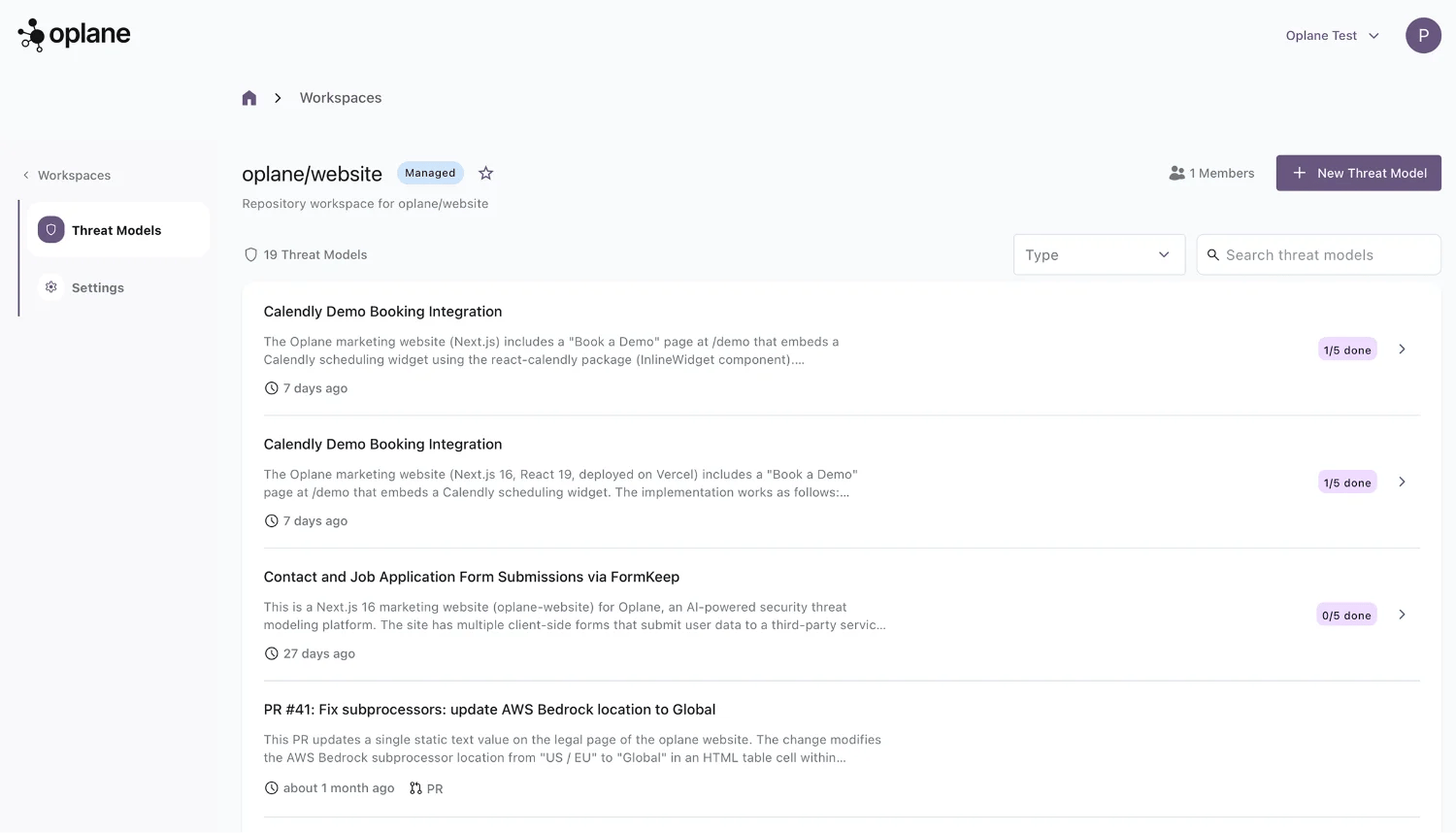
> Workspaces organise your threat models by project, team, or repository. Each workspace has its own members, access controls, and threat model history.
Workspaces organise your threat models by project, team, or repository. Each workspace has its own members, access controls, and threat model history.
 ## Workspace types
When creating a workspace, choose the type that matches your workflow:
#### Agent Workspace
Run threat modeling locally with your coding agent via MCP. Analyse any repository and upload results to Oplane. Best for developers running threat models from their IDE (Cursor, GitHub Copilot, Claude Code, etc.).
#### Managed Workspace
Let Oplane model threats in the cloud and continuously analyse changes across pull requests. Tied to a specific Git repository for automated PR/MR reviews.
## Creating a workspace
### Agent Workspace
To create an Agent Workspace, click **+ Workspace** in the top right corner and select **Agent Workspace**:
1. Enter a name for the workspace (e.g. your project name)
2. Add an optional description
3. Configure access — add team members by name or email
4. Set general access (restricted or open to the organisation)
5. Click **Create**
## Workspace types
When creating a workspace, choose the type that matches your workflow:
#### Agent Workspace
Run threat modeling locally with your coding agent via MCP. Analyse any repository and upload results to Oplane. Best for developers running threat models from their IDE (Cursor, GitHub Copilot, Claude Code, etc.).
#### Managed Workspace
Let Oplane model threats in the cloud and continuously analyse changes across pull requests. Tied to a specific Git repository for automated PR/MR reviews.
## Creating a workspace
### Agent Workspace
To create an Agent Workspace, click **+ Workspace** in the top right corner and select **Agent Workspace**:
1. Enter a name for the workspace (e.g. your project name)
2. Add an optional description
3. Configure access — add team members by name or email
4. Set general access (restricted or open to the organisation)
5. Click **Create**
 ### Managed Workspace
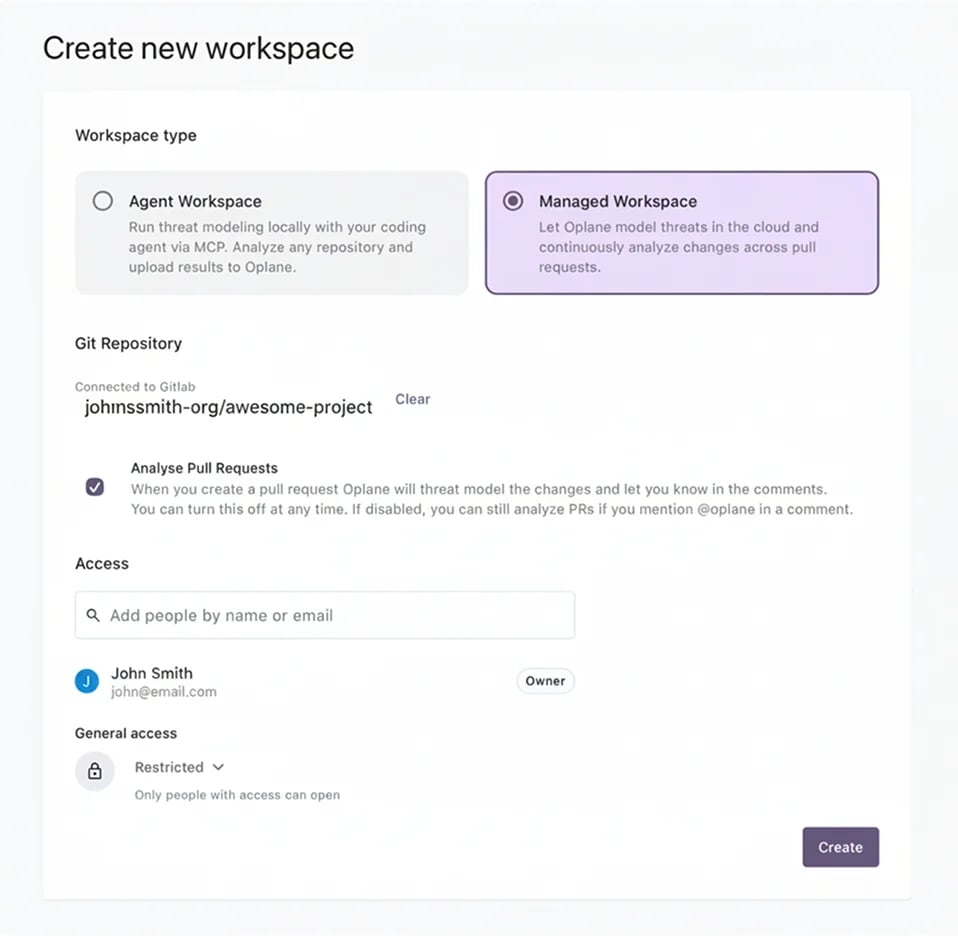
To create a Managed Workspace, select **Managed Workspace** and link it to a Git repository:
1. Select your organisation from the dropdown
2. Search for and select the repository you want to connect
3. Click **Create**
### Managed Workspace
To create a Managed Workspace, select **Managed Workspace** and link it to a Git repository:
1. Select your organisation from the dropdown
2. Search for and select the repository you want to connect
3. Click **Create**
 Managed Workspaces require a connected Git provider (GitHub or GitLab). If you haven't connected one yet, see [Connect GitHub](/docs/connect-github) or [Connect GitLab](/docs/gitlab-setup).
### Namespace claims
A **namespace** is a GitHub organisation or user account, or a GitLab group. An Oplane organisation can **claim** a namespace so that only its workspaces can subscribe to repositories under it. This gives customers a clean ownership boundary when multiple Oplane organisations touch the same Git provider tenant.
What you'll see when a namespace is claimed by a different Oplane organisation than your own:
* **Repository picker** — the namespace is greyed out and cannot be selected when creating a Managed Workspace.
* **Subscribe or reactivate** — attempting to link a repository under that namespace is blocked.
* **Existing subscriptions** — if a namespace you were already using gets claimed by a different organisation, your Managed Workspaces subscribed to its repositories are deactivated. No threat model data is deleted; workspaces, threat models, and requirements are preserved and become read-only until the claim situation is resolved.
Once a namespace is claimed, runtime access to its repositories is decided by **membership of the claiming organisation** rather than the per-user Git OAuth check. This means PR and MR reviews keep working for the whole workspace even if the user who originally connected the repository leaves or loses personal access.
Subscriptions in a namespace claimed by their own workspace's organisation are also protected from automatic deactivation on access loss. If the user who connected a repository unlinks their GitHub identity, loses provider access, or their token expires, the subscription row is preserved and coverage resumes once anyone in the claiming organisation re-authenticates. Individual runs may still be skipped while the underlying token is unhealthy.
Claiming a namespace is a service-admin action performed by Oplane. If you need a namespace claimed for your organisation, transferred between Oplane organisations, or unclaimed, contact Oplane support.
## Check failure threshold
Each Managed Workspace has an opt-in **check failure threshold** that controls when the **Oplane Security Review** check reports **Fail**. Pick a severity threshold in workspace settings — when combined with your CI pipeline's branch protection rules, this acts as a merge gate to prevent unresolved requirements at the level of your choosing from slipping through.
See [Check failure threshold](/docs/github-prs#check-failure-threshold) for the full setup.
## Managing workspaces
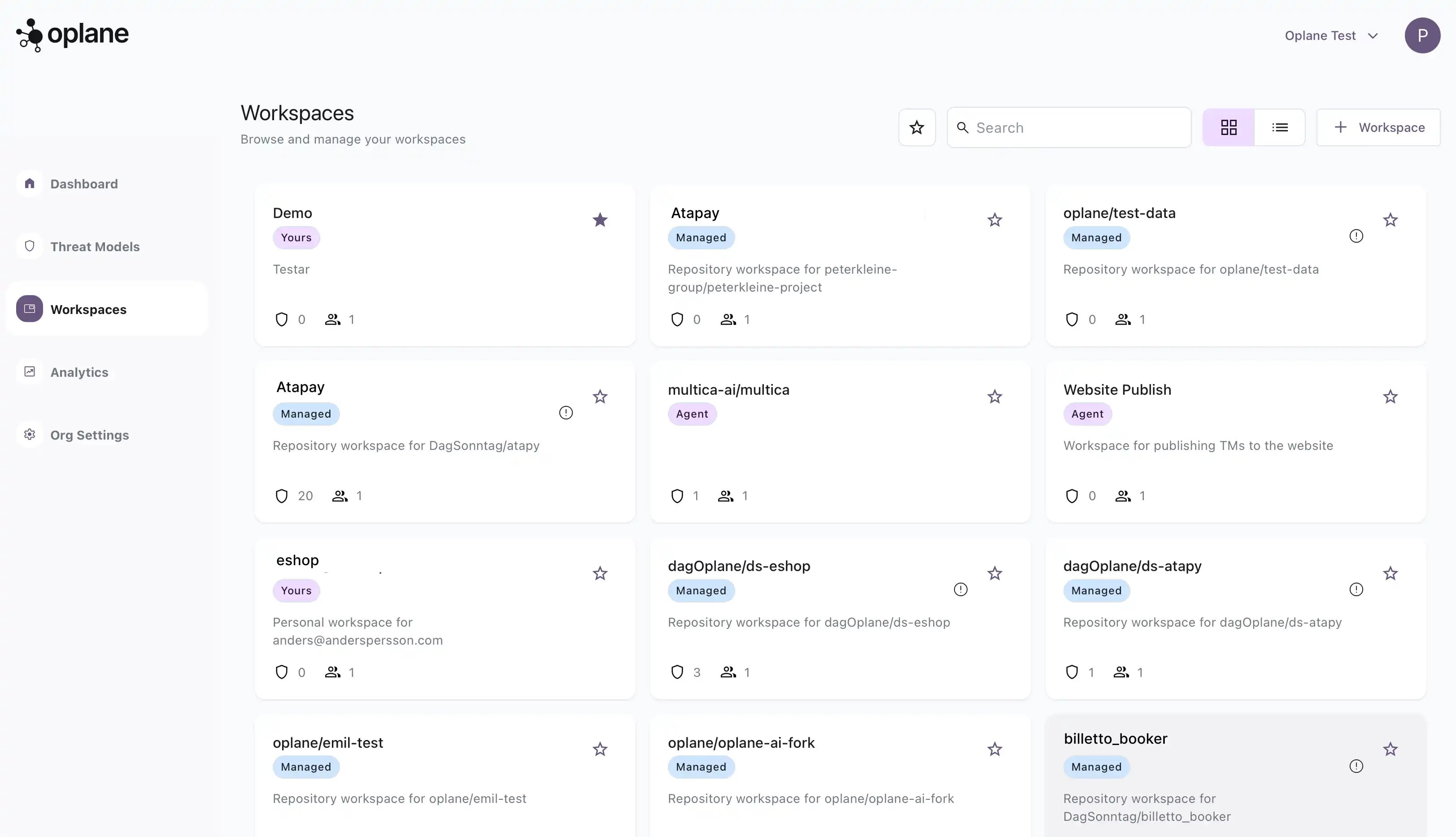
From the Workspaces page you can:
* **Star** workspaces to pin them at the top of your list
* **Search** across all workspaces by name
* **Switch views** between grid and list layout
* **Filter** by starred workspaces only
Each workspace card shows the workspace type, number of threat models, and member count at a glance.
Managed Workspaces require a connected Git provider (GitHub or GitLab). If you haven't connected one yet, see [Connect GitHub](/docs/connect-github) or [Connect GitLab](/docs/gitlab-setup).
### Namespace claims
A **namespace** is a GitHub organisation or user account, or a GitLab group. An Oplane organisation can **claim** a namespace so that only its workspaces can subscribe to repositories under it. This gives customers a clean ownership boundary when multiple Oplane organisations touch the same Git provider tenant.
What you'll see when a namespace is claimed by a different Oplane organisation than your own:
* **Repository picker** — the namespace is greyed out and cannot be selected when creating a Managed Workspace.
* **Subscribe or reactivate** — attempting to link a repository under that namespace is blocked.
* **Existing subscriptions** — if a namespace you were already using gets claimed by a different organisation, your Managed Workspaces subscribed to its repositories are deactivated. No threat model data is deleted; workspaces, threat models, and requirements are preserved and become read-only until the claim situation is resolved.
Once a namespace is claimed, runtime access to its repositories is decided by **membership of the claiming organisation** rather than the per-user Git OAuth check. This means PR and MR reviews keep working for the whole workspace even if the user who originally connected the repository leaves or loses personal access.
Subscriptions in a namespace claimed by their own workspace's organisation are also protected from automatic deactivation on access loss. If the user who connected a repository unlinks their GitHub identity, loses provider access, or their token expires, the subscription row is preserved and coverage resumes once anyone in the claiming organisation re-authenticates. Individual runs may still be skipped while the underlying token is unhealthy.
Claiming a namespace is a service-admin action performed by Oplane. If you need a namespace claimed for your organisation, transferred between Oplane organisations, or unclaimed, contact Oplane support.
## Check failure threshold
Each Managed Workspace has an opt-in **check failure threshold** that controls when the **Oplane Security Review** check reports **Fail**. Pick a severity threshold in workspace settings — when combined with your CI pipeline's branch protection rules, this acts as a merge gate to prevent unresolved requirements at the level of your choosing from slipping through.
See [Check failure threshold](/docs/github-prs#check-failure-threshold) for the full setup.
## Managing workspaces
From the Workspaces page you can:
* **Star** workspaces to pin them at the top of your list
* **Search** across all workspaces by name
* **Switch views** between grid and list layout
* **Filter** by starred workspaces only
Each workspace card shows the workspace type, number of threat models, and member count at a glance.