> ## Documentation Index
> Fetch the complete documentation index at: https://www.oplane.com/docs/llms.txt
> Use this file to discover all available pages before exploring further.
# Fix security requirements with Oplane
> Review the code fixes Oplane suggests for a pull or merge request and commit them to the branch in one click.
Click to fix is in early access. It's only available to organisations that Oplane has turned it on for. If you don't see the settings below, contact your Oplane representative.
When Oplane reviews a pull request or merge request and finds security requirements that need attention, it can also write the code fix for each one. You review the suggested changes in Oplane, pick the ones you want, and Oplane commits them to the PR or MR branch for you. For how reviews run, see [Pull requests](/docs/github-prs) for GitHub and [Merge requests](/docs/gitlab-mrs) for GitLab.
## Turn on suggested fixes
Suggested fixes are off by default. You turn them on per repository in workspace settings, so you need to be a workspace owner or an org admin. See [Roles and permissions](/docs/roles#workspace-permissions).
Open the workspace connected to the repository and go to its settings.
Find the linked repository and make sure PR/MR analysis is enabled.
Under **Suggest fixes for findings**, select **Manual**. Oplane then generates a fix for each unresolved finding it can fix automatically, and nothing gets committed until you apply it.
The setting applies to reviews that run after you change it. To get fixes on an open PR or MR, push a new commit or comment `oplane review` on it.
If your organisation also has autofix turned on, the dropdown has an **Autofix** option. With **Autofix**, Oplane commits every suggested fix automatically without anyone clicking **Implement**.
## Open the fixes from your PR or MR
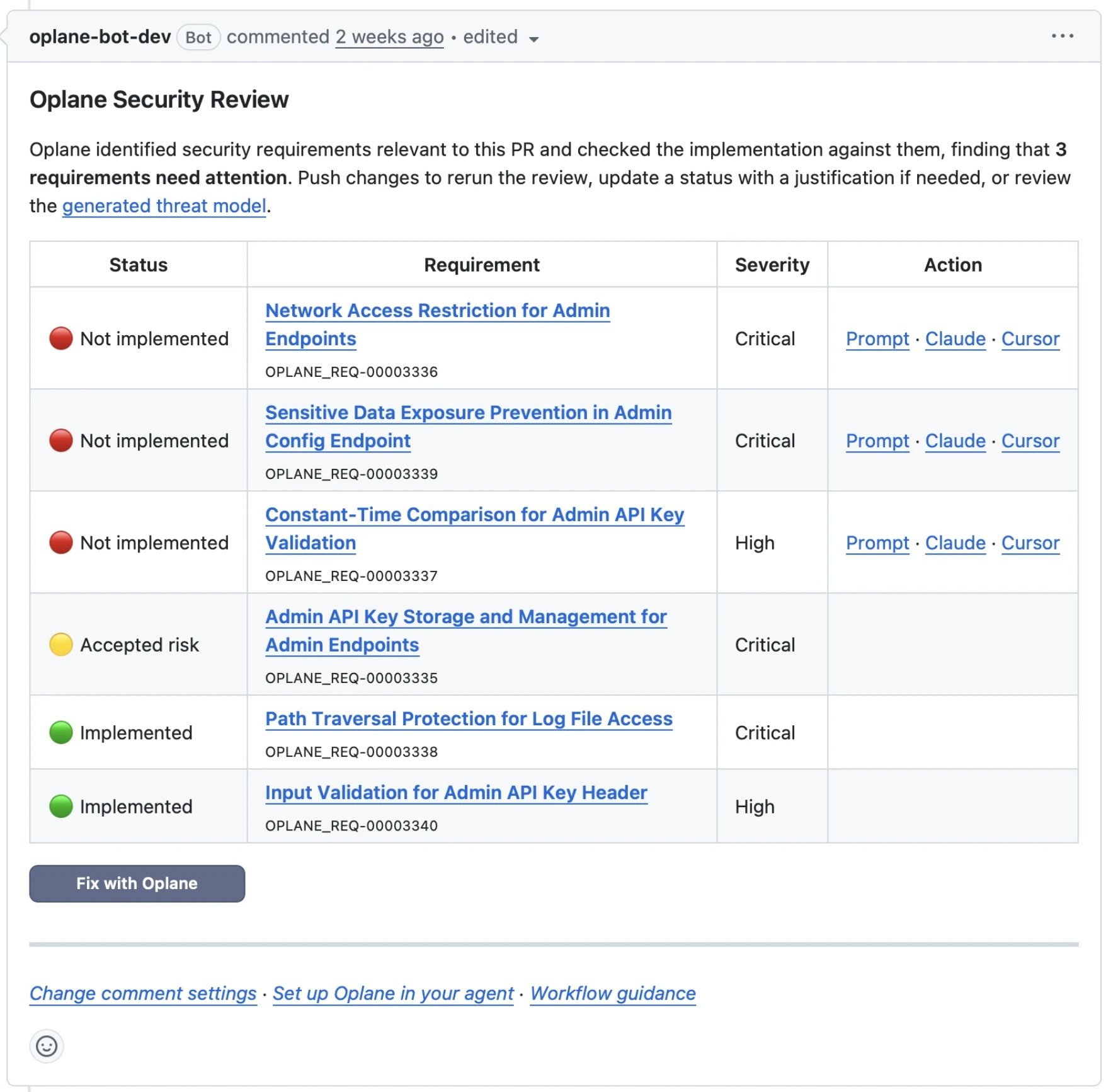
After the review finishes and the fixes are ready, the **Oplane Security Review** comment on the PR or MR gets a **Fix with Oplane** button. The button only appears once Oplane has generated all the fixes, so it can take a little longer to show up than the comment itself.
Click **Fix with Oplane** to open the fix page for that threat model in Oplane.
 ## Review the suggested fixes
The fix page lists the PR or MR requirements in three groups in the sidebar:
| Group | What it contains |
| - | - |
| **Suggested fixes** | Requirements Oplane wrote a code fix for. Each one has a checkbox and starts out checked. |
| **Manual fix required** | Requirements that need a developer. You can open them with **Fix in Cursor**, **Fix in Claude Code**, or **Copy prompt**. |
| **Resolved requirements** | Requirements already implemented, or marked accepted risk, out of scope, or not applicable. |
Select a requirement to see its rationale, the affected files, and a diff of the suggested change. Switch between **Split** and **Unified** to change how the diff is shown.
## Review the suggested fixes
The fix page lists the PR or MR requirements in three groups in the sidebar:
| Group | What it contains |
| - | - |
| **Suggested fixes** | Requirements Oplane wrote a code fix for. Each one has a checkbox and starts out checked. |
| **Manual fix required** | Requirements that need a developer. You can open them with **Fix in Cursor**, **Fix in Claude Code**, or **Copy prompt**. |
| **Resolved requirements** | Requirements already implemented, or marked accepted risk, out of scope, or not applicable. |
Select a requirement to see its rationale, the affected files, and a diff of the suggested change. Switch between **Split** and **Unified** to change how the diff is shown.
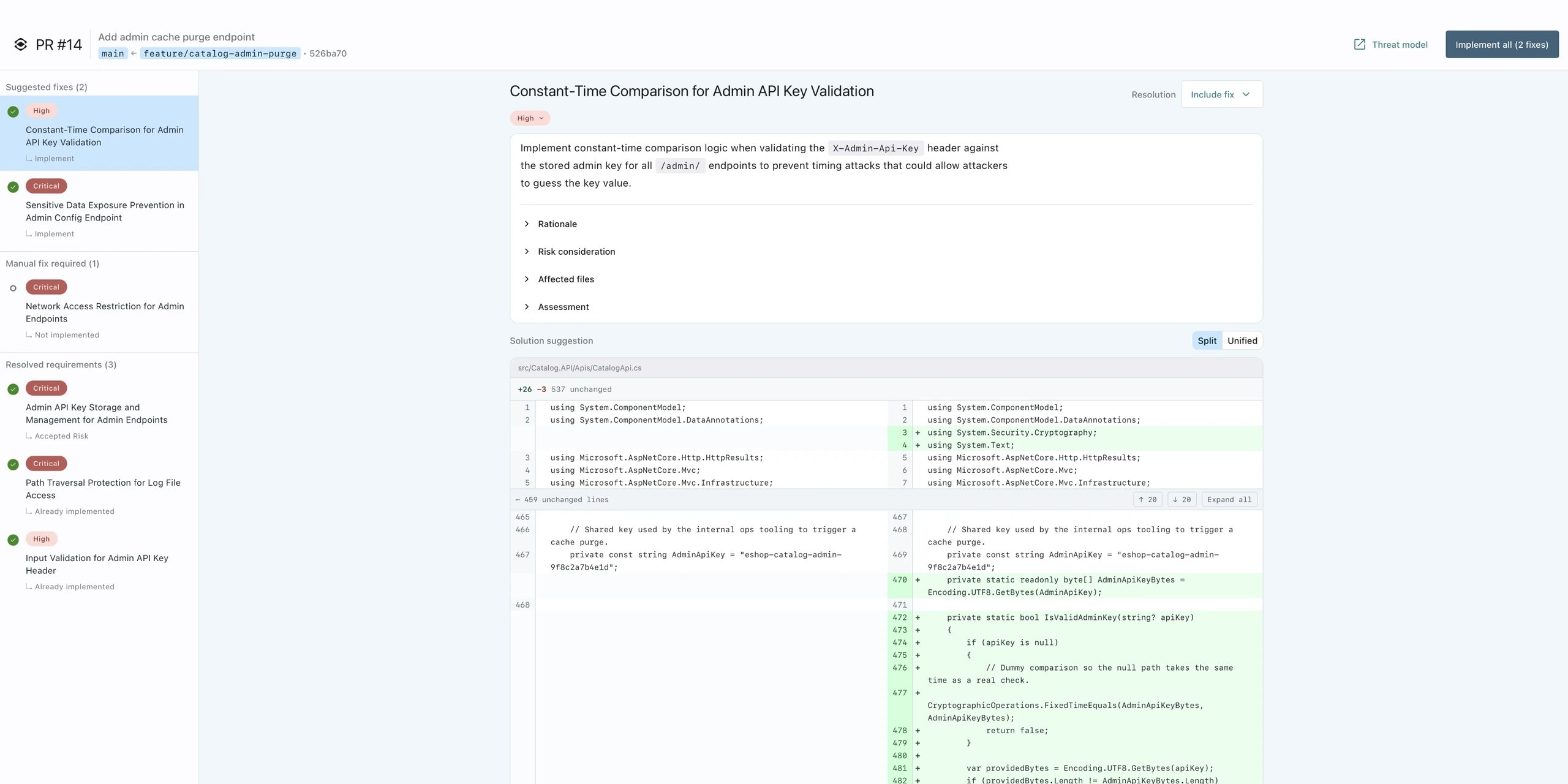 Uncheck any fix you don't want to apply. You can also use the **Resolution** menu on a requirement to pick **Exclude fix**, or set an implementation status such as **Accepted Risk** with a motivation.
If a new review starts on the PR or MR while you're on the fix page, the page is paused until the review finishes. That way you always apply fixes against the latest findings.
## Apply the fixes
Click **Implement all** (or **Implement** if you unchecked some fixes). The button shows how many fixes it will apply.
Oplane then shows the progress while it prepares the changes, applies them, and commits them. The fixes are committed together in one commit on the PR or MR source branch. If any of them can't be applied, Oplane commits nothing.
The commit is made by the Oplane app, not by your own Git account. Oplane still records who clicked **Implement** in its own audit log.
When the job is done, you see a list of the applied fixes and a **View commit** button. The new commit triggers a follow-up review, which checks that the fixes work and didn't introduce new issues.
If you leave the page while the job is running, you can come back to it later. The fix page shows a banner with **View progress** or **View result** until a newer review replaces the result.
## When a fix can't be applied
If Oplane can't commit the fixes, the result page tells you why:
| Message | What happened | What to do |
| - | - | - |
| **No fixes to apply** | None of the selected requirements had a fix ready. | Check that the requirements are in **Suggested fixes** and still checked. |
| **These fixes overlap** | Two or more fixes change the same lines, so they can't go in the same commit. | Apply the overlapping fixes one at a time, or fix the code manually. |
| **The branch changed since the review** | Someone pushed to the branch after Oplane reviewed it, so the fixes no longer match the code. If the branch was deleted, there's nothing to apply them to. | Wait for Oplane to review the latest commit (or comment `oplane review` on the PR or MR), then apply the new fixes. |
| **Oplane can't commit to this repository yet** | The Oplane app doesn't have permission to write to the repository. | On GitHub, approve the updated permissions for the Oplane GitHub App, or reinstall it. On GitLab, check that the Oplane bot still has Developer access to the project. |
| **Couldn't reach the repository** | Oplane couldn't access the repository. | Check that the Oplane app is still installed and has access to the repository, then try again. |
| **Implementation failed** | Something unexpected went wrong. | Try again. If it keeps failing, contact Oplane support. |
## Give feedback
Since click to fix is in early access, we'd like to hear what works and what doesn't. Send your feedback to your Oplane contact, and include a link to the PR or MR if you can.
Uncheck any fix you don't want to apply. You can also use the **Resolution** menu on a requirement to pick **Exclude fix**, or set an implementation status such as **Accepted Risk** with a motivation.
If a new review starts on the PR or MR while you're on the fix page, the page is paused until the review finishes. That way you always apply fixes against the latest findings.
## Apply the fixes
Click **Implement all** (or **Implement** if you unchecked some fixes). The button shows how many fixes it will apply.
Oplane then shows the progress while it prepares the changes, applies them, and commits them. The fixes are committed together in one commit on the PR or MR source branch. If any of them can't be applied, Oplane commits nothing.
The commit is made by the Oplane app, not by your own Git account. Oplane still records who clicked **Implement** in its own audit log.
When the job is done, you see a list of the applied fixes and a **View commit** button. The new commit triggers a follow-up review, which checks that the fixes work and didn't introduce new issues.
If you leave the page while the job is running, you can come back to it later. The fix page shows a banner with **View progress** or **View result** until a newer review replaces the result.
## When a fix can't be applied
If Oplane can't commit the fixes, the result page tells you why:
| Message | What happened | What to do |
| - | - | - |
| **No fixes to apply** | None of the selected requirements had a fix ready. | Check that the requirements are in **Suggested fixes** and still checked. |
| **These fixes overlap** | Two or more fixes change the same lines, so they can't go in the same commit. | Apply the overlapping fixes one at a time, or fix the code manually. |
| **The branch changed since the review** | Someone pushed to the branch after Oplane reviewed it, so the fixes no longer match the code. If the branch was deleted, there's nothing to apply them to. | Wait for Oplane to review the latest commit (or comment `oplane review` on the PR or MR), then apply the new fixes. |
| **Oplane can't commit to this repository yet** | The Oplane app doesn't have permission to write to the repository. | On GitHub, approve the updated permissions for the Oplane GitHub App, or reinstall it. On GitLab, check that the Oplane bot still has Developer access to the project. |
| **Couldn't reach the repository** | Oplane couldn't access the repository. | Check that the Oplane app is still installed and has access to the repository, then try again. |
| **Implementation failed** | Something unexpected went wrong. | Try again. If it keeps failing, contact Oplane support. |
## Give feedback
Since click to fix is in early access, we'd like to hear what works and what doesn't. Send your feedback to your Oplane contact, and include a link to the PR or MR if you can.